

-
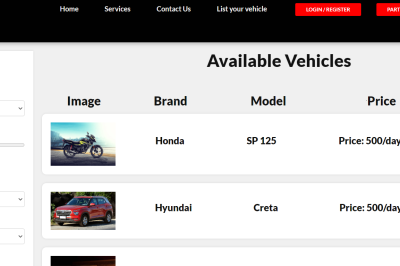
MotoShare Launches Bike Rental Services in Puri, Odisha
Exploring the spiritual town of Puri just got easier! MotoShare has expanded its bike rental services to Puri, Odisha, offering locals and tourists an affordable and flexible way to travel across the city’s sacred landscapes. Now you can rent bikes, motorbikes, and cars effortlessly to make the most of your visit. About MotoShare.in MotoShare.in is…
-
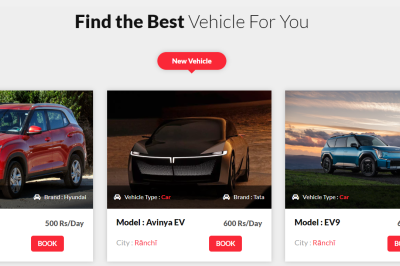
Moto share Launches Bike Rental Services in Alibaug, Maharashtra
MotoShare.in is thrilled to announce the launch of its bike rental services in the beautiful coastal town of Alibaug, Maharashtra. Known for its scenic beaches, historical forts, and serene environment, Alibaug is a popular destination for weekend getaways. With MotoShare’s bike rental services now available in the region, exploring Alibaug and its surroundings just got…
-

MotoShare Launches Bike Rental Services in Daman and Diu
If you’re planning to explore the coastal beauty of Daman and Diu, there’s exciting news for you! MotoShare has officially launched its bike rental services in this picturesque destination. Now, with just a few clicks, you can rent bikes, motorbikes, and even cars to enhance your travel experience. About MotoShare.in MotoShare.in is a peer-to-peer vehicle…
-

MotoShare Launches Bike Rental Services in Mahabalipuram, Tamil Nadu
MotoShare.in has launched its bike rental services in the historic town of Mahabalipuram, Tamil Nadu, offering locals and tourists a convenient and cost-effective way to explore the coastal city and surrounding attractions. With a range of bikes, motorbikes, and cars available for rent, MotoShare is fast becoming the go-to platform for vehicle rentals across India.…
-
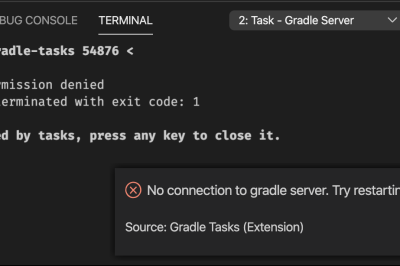
No Connection To Gradle Server && The Gradle Client Was Unable To Connect in Visual Studio Code
Error: Solution:
-
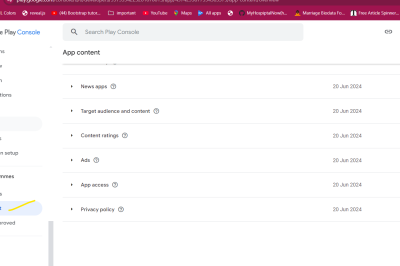
Your recent app update has been rejected for not adhering to the Google Play Developer Programme Policies.
Error: Solution: Step 1: Go to the App Content section in the Play Console. Step 2: App Access, choose “All or some functionality is restricted” and provide demo login credentials. Step 3: After that click After that fill login credentials After adding and publish your App
-
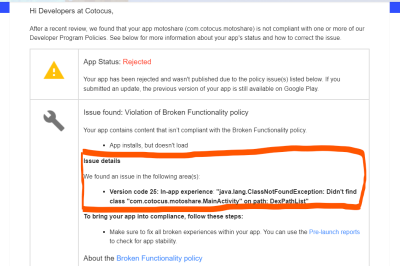
Action Required: Your app is not compliant with Google Play Policies
Error: Solution: Step 1: Check the MainActivity Class Ensure the MainActivity class exists: Step 2: Check the AndroidManifest.xml Verify the activity declaration: MainActivity.kt and AndroidManifest.xml the package name in the same Step 3: Check the Build Configuration
-
![Laravel say that Auth guard [] is not defined](https://www.sreschool.in/wp-content/themes/visualblogger/assets/img/featured_default.png)
Laravel say that Auth guard [] is not defined
Error: Sulotion: Step 1: Define the web Guard in config/auth.php Open the config/auth.php file in your Laravel project and make sure that the guards array includes a web guard definition. It should look something like this: Step 2: Ensure the providers Array Is Correctly Set Up In the same config/auth.php file, ensure that the providers…
-
composer require laravel/passport command error
Error: Solution: To resolve this issue, you can try the following steps: Step 1: Update Composer Dependencies Ensure that your existing dependencies are up-to-date by running: Step 2: install Version of Laravel Passport Step 3: Use the –with-all-dependencies Flag Step 4: Clear Composer Cache
-
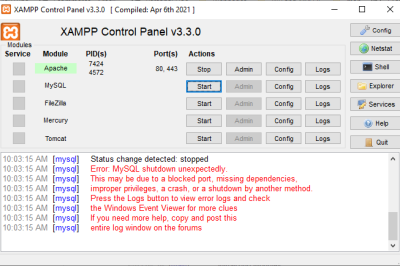
XAMPP – Error: MySQL shutdown unexpectedly
Error: Solution: Step 1: Rename the folder C:\xampp\mysql\data to C:\xampp\mysql\data_old Step 2: Create a new folder C:\xampp\mysql\data Step 3: Copy the content that resides in C:\xampp\mysql\backup to the new C:\xampp\mysql\data folder Step 4: Copy all your database folders that are in C:\xampp\mysql\data_old to C:\xampp\mysql\data (skip the mysql, performance_schema, and phpmyadmin folders from C:\xampp\mysql\data_old) Step 5: Finally copy the ibdata1 file from C:\xampp\mysql\data_old and replace it inside C:\xampp\mysql\data folder Step 6: Now Start…
-
composer require team-teatime/laravel-forum:dev-master
The command composer require team-teatime/laravel-forum:dev-master attempts to install the team-teatime/laravel-forum package from its dev-master branch, which is often the latest development version of the package. However, since you’re dealing with issues related to compatibility and installation, here’s how you should proceed: Steps to Run the Command: Step 1: Ensure You Are in Your Project Directory:…
-
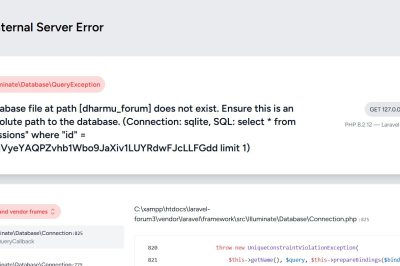
Database (database/database.sqlite) does not exist. The database works from artisan tinker
Error: Solution: 1. Check the Database Configuration in .env File: Change DB_CONNECTION=sqlite to DB_CONNECTION=mysql
-
Script @php artisan package:discover handling the post-autoload-dump event returned with error code 255
Error: Solution: Update the Handler Class To fix this issue, you need to update the method signature in your App\Exceptions\Handler class. 1. Open the Handler.php File Navigate to app/Exceptions/Handler.php. 2. Update the report Method Signature Replace: With: 3. Update the render Method Signature If your render the method also accepts an Exception, you’ll need to…
-

Your requirements could not be resolved to an installable set of packages.
Error: Solution: The error you’re encountering is due to the fact that the version of the pusher/pusher-php-server package you’re trying to install requires a PHP version that is older than the one you currently have (PHP 8.2.12). Specifically, the versions of pusher/pusher-php-server listed are only compatible with PHP 7.x or earlier. Solution: Update the Package…
-
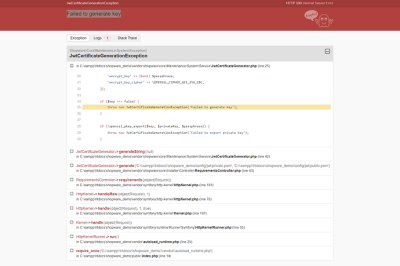
oauth-private.key does not exist or is not readable
Error: Sulotion: 1. Verify the File Path: 2. Check File Permissions: 3. Check the Key File Format: 4. Regenerate the Key Files: If the key files are missing or corrupted, you can regenerate them using Laravel Passport by running the following Artisan command: 5. Update the .env File (If Required): 6. Check for Any Path…
-

XML declaration allowed only at the start of the document
Error: Solution: Common Issues with XML Sitemaps Example of a Valid XML Sitemap Structure Adjustments to my PHP and XSL Structure: This updated PHP code ensures each hospital entry includes elements like <loc>, <lastmod>, <changefreq>, and <priority>, all of which are part of the standard sitemap protocol. Validation: Validate your XML sitemap using an online…
-
What is an ISIN Code?
What is an ISIN Code? The International Securities Identification Number (ISIN) is a 12-character alphanumeric code that uniquely identifies a specific securities issue, such as stocks, bonds, options, and futures. It is a standardized code used globally to ensure uniform identification of securities. Structure: Country Code: 2 characters (e.g., ‘IN’ for India) National Security Identifier:…
-

How to Create an XML Sitemap in Laravel
The dynamic sitemap.xml file creation in the Laravel application will be covered in this tutorial on Laravel 10. Furthermore, we also like to explain how to read the Laravel application’s sitemap xml file. You can use the spatie/laravel-sitemap package to construct an XML sitemap in a Laravel application. The steps—package installation, setup, and sitemap generation—are…
-
Top 50 Tourist Destination in around Bengalure in Karnataka
Karnataka, a state in southwest India, is known for its rich heritage, diverse culture, and stunning landscapes. Bengaluru, the capital city, is a gateway to many enchanting tourist destinations within the state. Here’s a list of the top 50 tourist spots you must visit in and around Bengaluru, and Karnataka. 1. Bangalore Palace 2. Lalbagh…
-

The quickest method for determining if your PHP array is empty
The fastest way to check if an array is empty To check whether a PHP array is empty or not, use the empty() function: This is how I prefer to do it. However, there are several ways to determine whether an array is empty, like: You can choose to end the process there or continue reading to…