Laravel
-

“The zip extension and unzip/7z commands are both missing, skipping” in Windows during Composer install of Laravel
Error: Solution: 1. Solve the “Untracked Files” Issue: Git is unable to proceed with the checkout because untracked files would be overwritten. Follow these steps: Option 1: Stash or Commit Your Changes If you have untracked files or changes that are not yet committed, you should either stash or commit them to avoid losing them.…
-

How to generate GOOGLE_CLIENT_ID and GOOGLE_CLIENT_SECRET
To generate the values for: you must register your app with Google and set up OAuth 2.0 credentials. Here’s a complete guide: ✅ Step-by-Step: Generate Google OAuth Credentials 🔐 Step 1: Go to Google Cloud Console 🔗 Link: https://console.cloud.google.com/apis/credentials 🏗️ Step 2: Create / Select a Project 🔌 Step 3: Enable APIs 🔑 Step 4:…
-

Laravel: String data, right truncated: 1406 Data too long for column
The error you’re encountering, String data, right truncated: 1406 Data too long for column, typically occurs in Laravel (or any other MySQL-based application) when you try to insert data into a database column that exceeds the defined size limit for that column. Here’s how you can fix this issue: Check the Column Size First, ensure…
-

Composer/Packagist could not find package for minimum stability
Error: Solution: Use a working Laravel-compatible Paytm package A working and maintained one is: 👉 anandsiddharth/laravel-paytm-wallet Install with: composer require anandsiddharth/laravel-paytm-wallet Then publish the config: Then configure in .env: This is a complete wrapper for Paytm Wallet.
-

composer require Laravel/passport command error
Error: Solution: Step 1: Check your PHP version: Run: Make sure it’s PHP 8.1 or higher, since many recent Laravel Passport versions (v11.8+ and v12.x) require it. Step 2: Check Laravel version compatibility Laravel Version Laravel Passport Laravel 10.x Passport ^11 Laravel 11.x Passport ^12 Make sure you’re using compatible versions of Laravel and Passport.…
-

Access Blocked:
has not completed the Google verification process Error: Solution: Step: 1-> Need to add the account as a test user under the OAuth consent screen: 1.) From the dashboard go to APIs & Services and click OAuth concent screen Step 2-> Under the Test users, click +Add Users. A menu will prompt on the right panel. Step3-> Input the users email Step 4-> This is in Google…
-
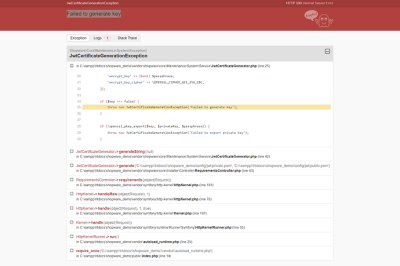
oauth-private.key does not exist or is not readable
Error: Sulotion: 1. Verify the File Path: 2. Check File Permissions: 3. Check the Key File Format: 4. Regenerate the Key Files: If the key files are missing or corrupted, you can regenerate them using Laravel Passport by running the following Artisan command: 5. Update the .env File (If Required): 6. Check for Any Path…
-

Can’t import database through phpmyadmin file size too large
Error: You probably tried to upload a file that is too large. Please refer to the documentation for a workaround for this limit. It sounds like you’re encountering an issue with file upload size limits in your Laravel application. Here are some steps to address this issue: Update PHP Configuration: Restart your web server to apply these…
-

The latest version of Laravel is 11! The latest major updates and features are listed here.
A slimmer application skeleton It was time to simplify and rethink the structure of a Laravel application with the release of Laravel 11. The objective? to provide you with a more streamlined and effective foundation for your endeavours. And they have delivered, I assure you. The all-new bootstrap/app.php file Reviving the bootstrap/app.php file to serve…
-

Laravel 10 Deployment Guide: Enhancing Web Application Security
One of the most important aspects of developing software today is web application security. It is crucial to make sure your Laravel 10 application is secure due to the growing sophistication of cyber attacks. Using the powerful security capabilities of Laravel 10, this tutorial will take you step-by-step through the process of safeguarding your online…
-

How to Build a RESTful APIs with Laravel 10
the ability to develop a scalable, clear, and effective API. The resource controllers and Eloquent ORM in Laravel make it very easy to provide APIs and interact with your data models. Setting Up Your Laravel Environment First, ensure you have Composer installed on your machine. Then, create a new Laravel project by running: After setting…
-

Enhancing Application Security with Laravel 10: New Features and Best Practices
Introduction: Laravel 10 has strong security capabilities to successfully protect your apps as they get more complex and are the target of malicious assaults. This blog examines these improvements, providing useful advice and real-world code samples to support you in strengthening your Laravel applications. 1.Improved Authorization Responses: Laravel 10’s more user-friendly gate and policy methods…
-

What’s New in Laravel 10: A comprehensive guide to the latest features and updates.
Introduction: The most recent version of the well-liked PHP framework, Laravel 10, has a number of innovative features that improve the development process. This blog will explore these new features and provide useful examples to assist you in successfully incorporating them into your projects. 1.Enhanced Routing Efficiency:The routeing performance is greatly improved by Laravel 10.…
-

Troubleshooting “Checksum Provided is Invalid” Error in Paytm Integration
Error: [2024-04-19 11:57:51] local.ERROR: Invalid checksum {“exception”:”[object] (Exception(code: 0): Invalid checksum at C:\\xampp\\htdocs\\blog\\vendor\\anandsiddharth\\laravel-paytm-wallet\\src\\Providers\\PaytmWalletProvider.php:51) Introduction: When Paytm is integrated into your application, you may occasionally see the typical error “Checksum provided is invalid.” Ensuring data security and integrity throughout transactions depends heavily on this error. Using sample code, this blog post will walk you through locating…
-

How to Integrate PayPal Payment Gateway in Laravel 10
Introduction: Paypal is a global payment option that is compatible with most nations that allow online money transfers. Paypal offers a more rapid and secure method of money transfers. The majority of e-commerce companies use Paypal to receive payments from clients because of its widespread use. We will incorporate the Paypal payment gateway into a…
-

PAYTM PAYMENT GATEWAY INTEGRATION IN LARAVEL 10
Introduction: In this article, I’ll walk you through integrating the Paytm payment gateway into a Laravel 10 application. In terms of the market nowadays, particularly in India, everything is digital. India has become a digital country. One well-known e-commerce and payment company in India is Paytm. They offer a really simple way to purchase, recharge…
-

Laravel – Composer Autoload Error
Errors during package management and autoloading are not unusual in the world of Laravel development. These failures can be caused by PSR-4 autoloading standards problems or by incorrect Composer directives. Error 1: Incorrect Composer Command When trying to uninstall the Laravel Telescope package, you made a mistaken Composer command. This is the first error you…
-

Performance Checklist for Laravel
Performance checklist for Laravel with examples this step Server Configuration Laravel Configuration Database Optimization Code Optimization Asset Optimization Monitoring and Profiling Infrastructure Scaling Miscellaneous Your Laravel application’s performance can be raised by adopting these optimisations and according to this checklist.
-

How to fix the error “In order to use the Auth::routes() method, please install the laravel/ui package” in laravel 10
Error Solution: It indicates that you need to install the Laravel/ui package in order to use the Auth::routes() method. To resolve this issue, you can follow these steps: Step 1: Install the laravel/ui package using Composer: Step 2: Generate authentication scaffolding for it. For Bootstrap-based scaffolding: For Vue.js-based scaffolding: For React-based scaffolding: Step 3: Use Auth::routes() in routes/web.php

Follow Us
Recent Posts
- Complete Guide to Certified Site Reliability Manager Certification
- Awesome City Play And Joyful Weekends With HyderabadOrbit

- Career Growth After Certified Site Reliability Architect Certification

- How SRE Architects Balance Reliability, Scalability, and Cost

- Safe Paths to Painless Walking Far Away with HipHospitals

Categories
- access 1
- Administration 1
- AIOps 1
- Apache 2
- API 3
- App 7
- Application 1
- Bottom 1
- class 1
- CLI 1
- Client 1
- Commands 3
- Composer 1
- Container 1
- daemon 1
- Database 1
- DevOps 2
- DevSecOps 2
- Docker 3
- dropdown 1
- Encryption 1
- Error 1
- features 1
- Flutter 20
- Form 2
- Gateway 1
- Google 2
- google play console 2
- Google verification 1
- install 1
- Integrate 1
- Key 2
- lampp 1
- Laravel 19
- linux 5
- List 1
- MaterialApp 1
- Medical Tourism 1
- MLOps 2
- Motoshare 1
- MySQL 4
- NavigationBar 1
- Navigator 2
- package 1
- Payment 2
- Paypal 1
- Performance 1
- PHP 3
- phpmyadmin 7
- PID 1
- Ping 1
- Play Store 2
- PONG 1
- port 1
- ProFTPD 1
- Redis 1
- root 1
- running 1
- search 1
- Security 2
- server 3
- SRE 2
- subtype 1
- Troubleshooting 2
- ubuntu 1
- ui 1
- Uncategorized 688
- Unhandled 1
- Validation 2
- value 1
- WakilSahab.in 1
- widgets 2
- Windows 2
- XAMPP 5
- YouTube 1
Tags
#AssetManagement #Automation #CloudComputing #CloudEngineering #CloudInfrastructure #CloudNative #ContentManagement #DAM #DAMSoftware #DevOps #DevOpsCertification #DevOpsSchool #DevSecOps #DigitalAssetManagement #DigitalAssets #InfrastructureAsCode #ITCertification #Kubernetes #PlatformEngineering #RajeshKumar #ReliabilityEngineering #SEOManagement #SiteReliabilityEngineering #SRE #SRECertification #Sreschool #SystemReliability #TechCareers #Wizbrand Laravel