Flutter
-

Action Required: Your app is not compliant with Google Play Policies (MyHospitalNow)
Error: Solution: To update your privacy policy declaration, follow these steps:
-

Flutter – ‘initialValue == null || controller == null’: is not true. error
The error you’re encountering in Flutter, ‘initialValue == null || controller == null’: is not true, typically occurs when you’re using a TextFormField or TextField widget and either the controller or initialValue parameter is null when it shouldn’t be. Here’s what the error means: Sulotion Check Controller Initialization If you’re using a TextEditingController, ensure that…
-

Flutter – ‘initialValue == null || controller == null’: is not true. error
Error: Solution: To fix this, follow these steps: Here’s the corrected code:
-

Flutter Could not prepare to run the isolate
Error: Solution:
-

How to upload the Flutter app to the Play Store
Generate an APK or App Bundle for your app: You can generate an APK or App Bundle using the following command in the terminal: Step 1: Run in your terminal Step 2: Run your terminal Step 3: run this command on your terminal Step 4: Open your project in Android Studio. and wait for a while it will…
-

What is MaterialApp class in Flutter
MaterialApp Class: In a flutter, MaterialApp is a preconfigured class or widget. It is probably a flutter app’s primary or central component. A wrapper for other Material Widgets is offered by the MaterialApp widget. We have access to every other widget and component that the Flutter SDK offers. The types of widgets that may be…
-

BottomNavigationBar Widget in Flutter
To display the bottom of an application, utilise the BottonNavigationBar widget. Depending on how the programme is designed, it may have a variety of elements such as text, icons, or both that point in different directions. Its purpose is to facilitate the user’s navigation to various portions of the programme as a whole. Constructors: Properties:
-

What is Container class in Flutter
In Flutter, the Container class is a handy widget that integrates typical widget painting, positioning, and size. We can store one or more widgets in a container class and arrange them on the screen as we see fit. In essence, a container is just a box used to hold things. A margin delineates the current…
-

What is widgets in Flutter?
Using a single code base, Flutter is Google’s UI toolkit for creating stunning natively built iOS and Android apps. Widgets are the foundational element of Flutter applications, and we begin by building any application with them. Widgets specify how their current configuration and status should appear in their display. Among many other widgets, it has…
-

The Dart Programming Language for Flutter Beginners
The general-purpose programming language Dart is available for free. Google was the one who developed it initially. The object-oriented language Dart has syntax in the C manner. Unlike other programming languages, it offers concepts like classes and interfaces. Arrays are not supported by Dart. Arrays, generics, and optional type are examples of data structures that…
-

Form Validation in Flutter
Form validation is required for all applications. There exist alternative methods for validating forms within a Flutter application, such as employing a TextEditingController. However, in large systems, it might become complex to manage text controllers for every input. Thus, Form provides us with a useful way to confirm user inputs. While the example below applies…
-

How to create a search bar in Flutter
Flutter is renowned for the versatility it provides to a broad range of applications, including banking apps, e-commerce sites, and educational programmes, among many others. Widgets, which serve as basic building blocks for intricate applications, enable all of this. Every app may be dissected into a number of components, some universal to all apps and…
-

Flutter Multiple Select dropdown list
how to use a multiple select drop-down list with the same design? I utilised the (flutter_custom_selector) plugin, but I need to know how to construct a multiple select dropdown list in Flutter without using any plugins. My code is and my design is Click to view Design image
-

How to Make Navigation from One Screen to Other in Flutter.
Simply follow the steps below to navigate from one screen to the next:- Step 1: Create two new files with the name “home” as the first step.Dart and elsewhere. Step 2: Import the material into main.dart now.Dart package library and home.dart are both used. See the photo below. Step 3: We now call the main()…
-
![[SOLVED] Unhandled Exception: Navigator operation requested with a context that does not include a Navigator.](https://www.sreschool.in/wp-content/uploads/2023/09/maxresdefault.jpg)
[SOLVED] Unhandled Exception: Navigator operation requested with a context that does not include a Navigator.
This happens because when you do Navigator.of(context), it will start from the widget associated to the context used. And then go upward in the widget tree until it either find a Navigator or there’s no more widget. So, it throws an Error Navigator operation requested with a context that does not include a Navigator. So, how…
-

How to Check if an application is on its first run or One time Intro Screen with Flutter.
If you wish to show the intro screen only for the first time, you will need to save locally that this user has already seen intro. For such thing you may use Shared Preference. There is a flutter package Shared Preferences which you can use. Please refer to the below complete tested code to understand how to…
-
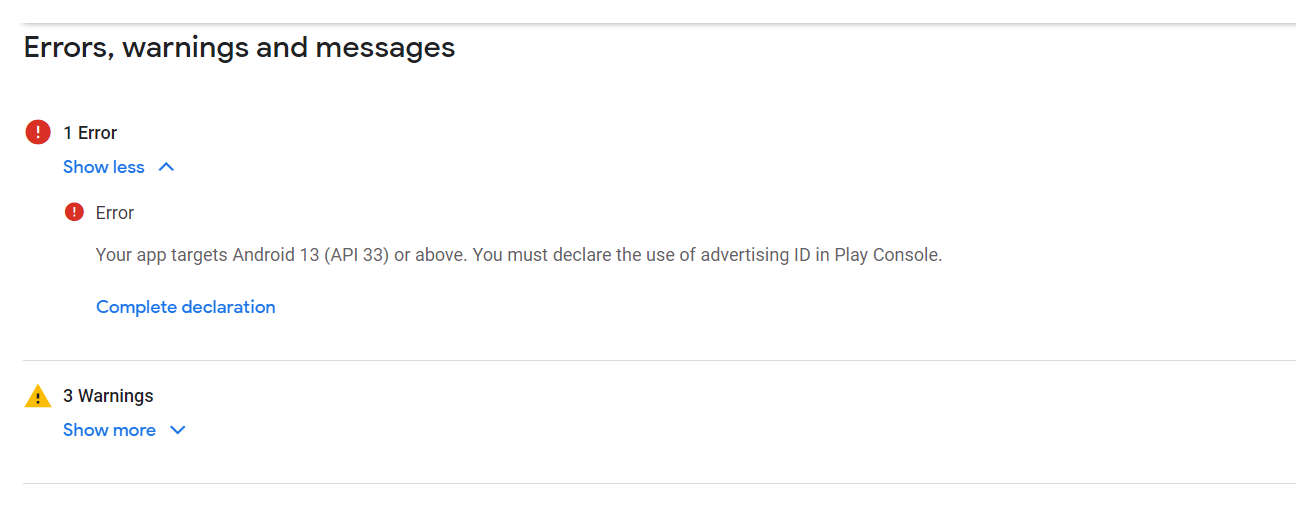
Your app targets Android 13 (API 33) or above. You must declare the use of advertising ID in Play Console.
Error Solution Step 1: Click Complete declaration Step 2: Choose your app(Does your app use an advertising ID? NO and Yes) Step 3: Click No, The Problem is solved
-

Form Validation in Flutter
Every application needs to have form validation. There are other ways to validate forms in the flutter application, for as by utilising a TextEditingController. However, managing text controllers for each input can get complicated in large applications. As a result, Form offers us a practical method for verifying user inputs. Although the condition is applied…
-
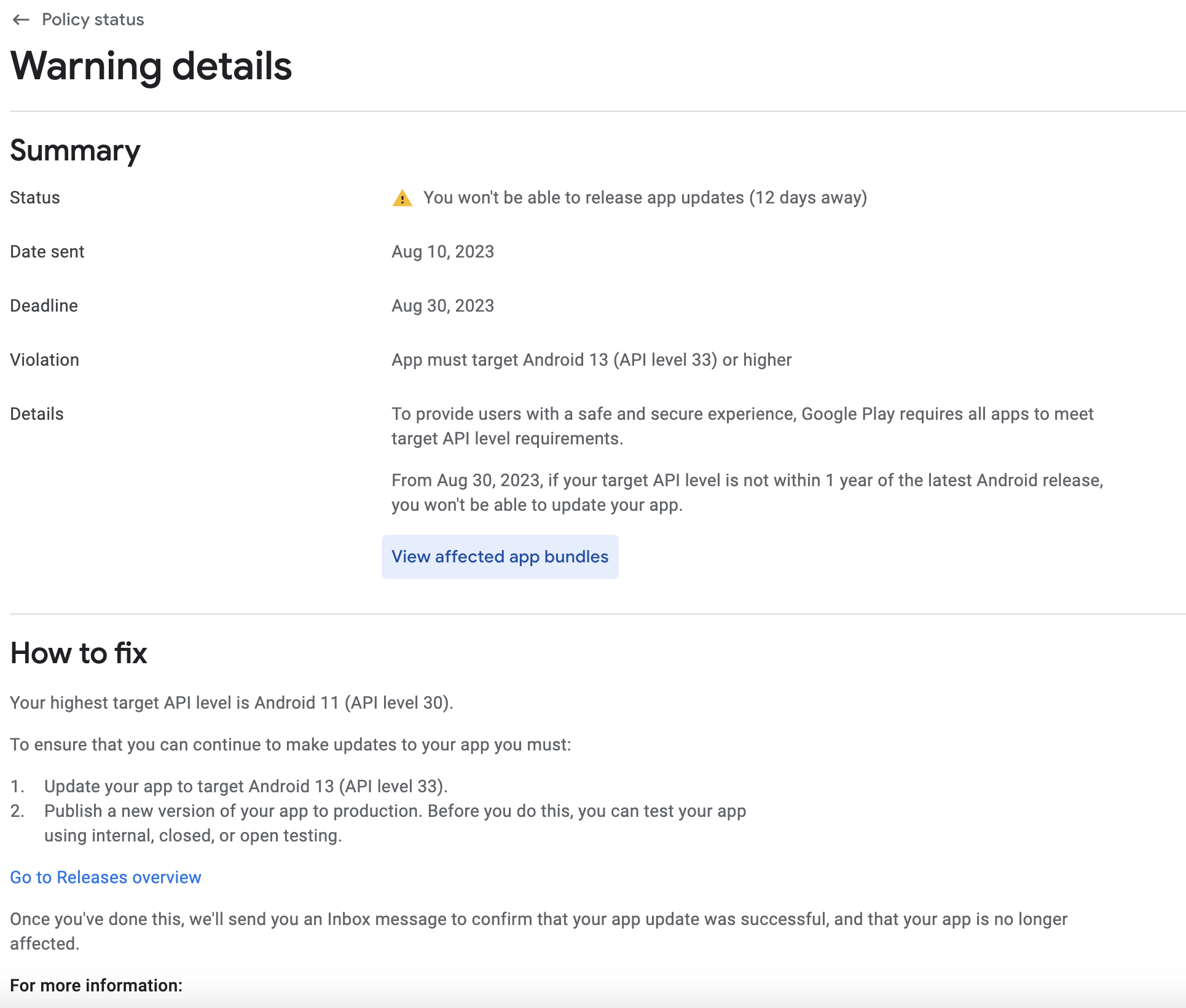
Your app currently targets API level 31 and must target at least API level 33 to ensure it is built on the latest APIs
Error Solution: Step 1: Got to your project pubspec.yaml file and change version Step 2: Got to your project terminal and run this command flutter pub get Step 3: Got to your project terminal and run this command flutter clean Step 4: Got to your project terminal and run this command Step 5: Open your…
-
![[ERROR: flutter/runtime/dart_vm_initializer.cc(41)] Unhandled Exception: type ‘List’ is not a subtype of type ‘FutureOr’](https://www.sreschool.in/wp-content/uploads/2023/09/image-15.png)
[ERROR: flutter/runtime/dart_vm_initializer.cc(41)] Unhandled Exception: type ‘List’ is not a subtype of type ‘FutureOr’
Error It looks like the error you’re encountering is due to a type mismatch between the return type of your getDoctors function and the expected return type when setting the doctors state. You’re trying to set a list (List) to the doctors state, but the function is declared to return a Future. To resolve this…

Follow Us
Recent Posts
- Complete Guide to Certified Site Reliability Manager Certification

- Awesome City Play And Joyful Weekends With HyderabadOrbit

- Career Growth After Certified Site Reliability Architect Certification

- How SRE Architects Balance Reliability, Scalability, and Cost

- Safe Paths to Painless Walking Far Away with HipHospitals

Categories
- access 1
- Administration 1
- AIOps 1
- Apache 2
- API 3
- App 7
- Application 1
- Bottom 1
- class 1
- CLI 1
- Client 1
- Commands 3
- Composer 1
- Container 1
- daemon 1
- Database 1
- DevOps 2
- DevSecOps 2
- Docker 3
- dropdown 1
- Encryption 1
- Error 1
- features 1
- Flutter 20
- Form 2
- Gateway 1
- Google 2
- google play console 2
- Google verification 1
- install 1
- Integrate 1
- Key 2
- lampp 1
- Laravel 19
- linux 5
- List 1
- MaterialApp 1
- Medical Tourism 1
- MLOps 2
- Motoshare 1
- MySQL 4
- NavigationBar 1
- Navigator 2
- package 1
- Payment 2
- Paypal 1
- Performance 1
- PHP 3
- phpmyadmin 7
- PID 1
- Ping 1
- Play Store 2
- PONG 1
- port 1
- ProFTPD 1
- Redis 1
- root 1
- running 1
- search 1
- Security 2
- server 3
- SRE 2
- subtype 1
- Troubleshooting 2
- ubuntu 1
- ui 1
- Uncategorized 688
- Unhandled 1
- Validation 2
- value 1
- WakilSahab.in 1
- widgets 2
- Windows 2
- XAMPP 5
- YouTube 1
Tags
#AssetManagement #Automation #CloudComputing #CloudEngineering #CloudInfrastructure #CloudNative #ContentManagement #DAM #DAMSoftware #DevOps #DevOpsCertification #DevOpsSchool #DevSecOps #DigitalAssetManagement #DigitalAssets #InfrastructureAsCode #ITCertification #Kubernetes #PlatformEngineering #RajeshKumar #ReliabilityEngineering #SEOManagement #SiteReliabilityEngineering #SRE #SRECertification #Sreschool #SystemReliability #TechCareers #Wizbrand Laravel