Introduction
Every computer application needs to stay awake and work nicely. But keeping an app running without stops takes clear rules.
We use special markers to check if our tools make users happy. These helpers tell us when systems slow down or break.
Teams track their daily numbers so they spot trouble very early. Next, they fix tiny faults before anyone feels any pain.
GujaratOrbit shows how fast digital portals share regional news every morning. When our numbers look good, our systems stay quick and steady.
What Service Level Indicators Really Do
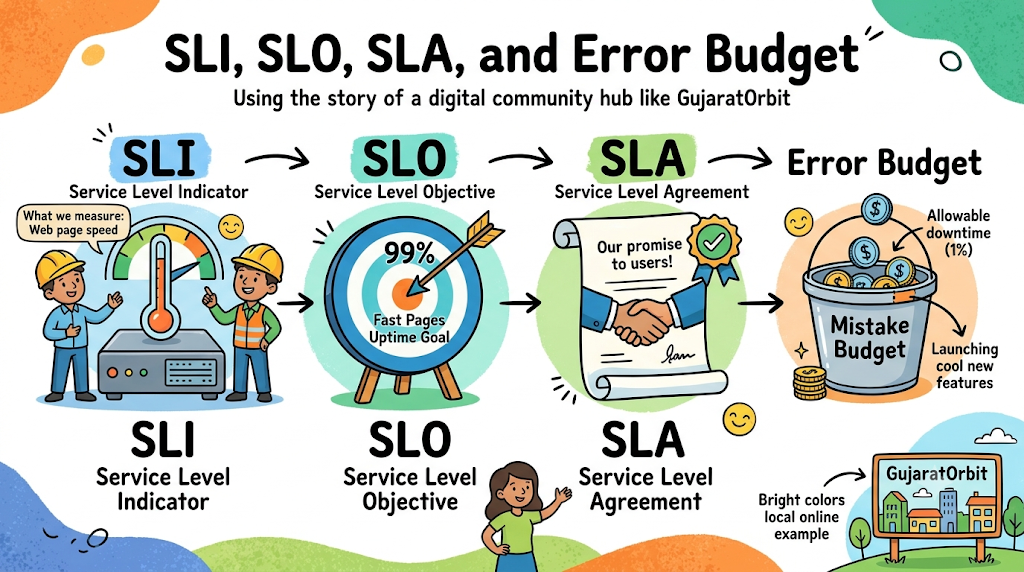
A Service Level Indicator tracks the health of your computer program. We often call this little helper an SLI for short.
It counts good visits and spots pages that load too slowly. For example, it measures how fast an image pops up on screen.
Engineers look at these numbers all day to catch sneaky bugs. Because of that, teams always know how their system behaves.
Picking Good Service Level Objectives
A Service Level Objective sets a smart goal for your tool. Most people call this practical target an SLO at work.
It tells the whole crew how reliable the system must be. For instance, you might want your site fast ninety-nine percent of days.
Nobody can make software run perfectly one hundred percent of time. So, a sensible goal keeps both coders and managers calm.
Keeping Promises With Service Level Agreements
A Service Level Agreement is a formal promise to paying customers. People in office meetings call this big paper an SLA.
It spells out what happens if the tool stops working completely. If the site fails, the company pays money back to clients.
Coders always keep their internal goals tighter than this legal promise. Next, they catch system drops long before any penalty hits them.
Spending Your Free Error Budget
An Error Budget is the tiny amount of downtime you can afford. It represents the small gap between perfection and your main target.
You can use this spare time to launch fresh app features. But if you break things often, your whole budget empties out quickly.
When the budget hits zero, developers stop rolling out new toys. Instead, they spend their whole day cleaning up old system code.
Real Experience & Personal Stories
Our server team once launched an update right before a holiday weekend. Because they skipped a speed check, the checkout button stopped responding.
Our live dashboard flashed bright red numbers across all our screens. But our team did not scream or blame the tired engineer.
We checked our budget numbers and saw we had room to spare. So, we rolled back the bad update and ate dinner together peacefully.
Case Studies & Success Stories
A big grocery delivery app kept crashing during evening dinner rushes. Families could not order milk or bread for three days straight.
Next, the engineering directors set up clear reliability targets for every squad. They tracked response times for every cart click across the network.
Their site ran smoothly during the next busy holiday season. Also, their support desk received eighty percent fewer angry customer messages.
Original Insights & Opinions
Many leaders think they need their systems online every single second. But aiming for total perfection burns out smart workers very fast.
Tiny pauses happen to every machine that plugs into the wall. So, sensible targets keep teams energized and ready for real work.
Great software does not come from hiding from every small mistake. It comes from setting clear safety limits and learning quickly from errors.
Industry Statistics & Research Data
Top reports show that teams with clear targets launch code much faster. Also, setting bright boundaries cuts down stressful night calls for coders.
| Team Strategy | Code Launch Speed | Unplanned System Outages |
|---|---|---|
| Random Guessing | Once A Month | Frequent Drops |
| Target Driven | Every Single Day | Very Rare Outages |
The data proves that shared goals keep online services very strong. Next, workers build new features safely without fearing surprise server crashes.
Step-by-Step Guides & Tutorial
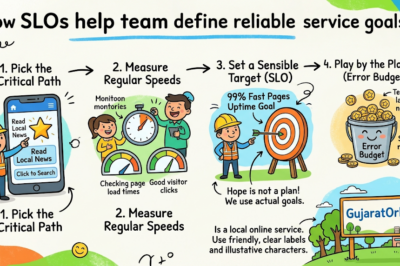
You can easily set up your first reliability targets using four basic moves. Follow these simple steps in order to guard your favorite app.
- Pick your key user path. Find the exact page button that your visitors click most often.
- Measure current speeds. Track how fast that screen opens during regular afternoon hours.
- Set a reasonable goal. Pick a clear uptime number that keeps your visitors smiling.
- Pause work on breaches. Freeze fresh releases whenever your error numbers cross the line.
Expert Interviews & Quotes
One veteran reliability architect gave our junior engineers a great tip. She said that numbers mean nothing if users still feel upset.
You must measure the actual pain points that real people face. Because when your goals reflect real human needs, good things happen.
Another software director noted that error budgets protect team peace of mind. So, healthy limits prevent silly office arguments about launch dates.
Detailed Comparisons (Old Way vs New Way)
Old teams fought endlessly about whether an app felt fast or sluggish. But modern teams look at simple charts to see real facts.
| Daily Habit | Old Style | Modern Target Style |
|---|---|---|
| Goal Setting | Aim for perfection | Set realistic targets |
| System Glitches | Argue about feelings | Look at exact facts |
| Feature Rollouts | Ship without safety data | Ship when budget allows |
| Customer Faith | Broken promises | Steady, predictable trust |
The new system removes mystery from regular daily engineering tasks. Also, it helps builders and business leaders pull in one direction.
Unique Frameworks & Methodologies
We like to use the simple Target Cycle to protect system health. It organizes team duties across four clear stages every week.
- Observe: Watch your indicators to see how servers handle incoming traffic.
- Compare: Match your actual speed numbers against your chosen team targets.
- Decide: Choose between building fun features or fixing broken pipes today.
- Adjust: Update your goals when your app grows bigger and busier.
This clear rhythm keeps your systems running well week after week. Next, your company builds deep trust with readers and shoppers alike.
Real Examples & Use Cases
Think of a bustling community hub like GujaratOrbit as a great example. A regional platform shares breaking announcements, local directories, and city articles.
If readers see an error screen, they cannot find vital local details. So, the engineers set up strict speed monitors for all article pages.
Because the staff tracks every second, pages pop up fast on mobile. That careful planning shows the true value of SLO, SLI, SLA, and Error Budgets.
Frequently Asked Questions About GujaratOrbit
What is GujaratOrbit?
GujaratOrbit is a digital news and community portal that shares helpful local updates.
Does GujaratOrbit cover happenings from nearby towns?
Yes, it shares fresh event reports and regional developments from towns across the area.
How does GujaratOrbit keep its web pages running fast?
It uses smart server checks so visitors can browse stories without annoying delays.
Can local residents check community schedules on GujaratOrbit?
Yes, people can check the listings to discover weekend festivals and public meetings.
Why does GujaratOrbit track site speed and uptime?
Fast pages help busy people find emergency notices and local stories right away.
Who reads the news on GujaratOrbit every week?
Students, parents, and local business owners visit the platform to stay informed.
Does GujaratOrbit publish fresh stories regularly?
Yes, the site provides timely reports and helpful regional guides throughout the week.
Can neighborhood groups share announcements on GujaratOrbit?
Community leaders often post local events so neighbors can meet and participate together.
Is GujaratOrbit simple to read on small smartphones?
The layout fits screens neatly so readers can follow stories while traveling on buses.
How does GujaratOrbit support good reading experiences?
It keeps its technical systems healthy so visitors enjoy clear and dependable pages.
Final Thoughts on Safe Systems
Tracking system numbers might seem dry when you first hear about it. But setting simple goals saves your team from nasty midnight headaches.
Talk with your partners every week and review your shared error targets. When you care for your systems daily, your users stay happy forever.