shutdown
-
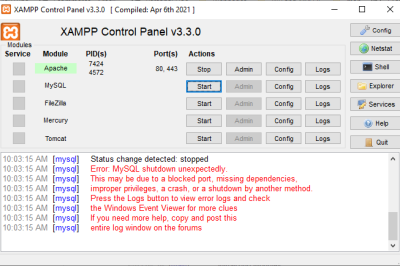
XAMPP – Error: MySQL shutdown unexpectedly
Error: Solution: Step 1: Rename the folder C:\xampp\mysql\data to C:\xampp\mysql\data_old Step 2: Create a new folder C:\xampp\mysql\data Step 3: Copy the content that resides in C:\xampp\mysql\backup to the new C:\xampp\mysql\data folder Step 4: Copy all your database folders that are in C:\xampp\mysql\data_old to C:\xampp\mysql\data (skip the mysql, performance_schema, and phpmyadmin folders from C:\xampp\mysql\data_old) Step 5: Finally copy the ibdata1 file from C:\xampp\mysql\data_old and replace it inside C:\xampp\mysql\data folder Step 6: Now Start…

Follow Us
Recent Posts
- How Great Doctors Fix Your Body’s Water Pipes Fast
- Trek Golden Valleys, Taste Crunchy Treats, And Experience Bihar Today

- Navigating City Entertainment And Finding Great Weekend Activities
- Certified Site Reliability Architect Credential Career Framework
- Practical Roadmaps for Choosing Modern Knee Care Facilities and Operations

Categories
- access 1
- Administration 1
- AIOps 1
- Apache 2
- API 3
- App 7
- Application 1
- Bottom 1
- class 1
- CLI 1
- Client 1
- Commands 3
- Composer 1
- Container 1
- daemon 1
- Database 1
- DevOps 2
- DevSecOps 2
- Docker 3
- dropdown 1
- Encryption 1
- Error 1
- features 1
- Flutter 20
- Form 2
- Gateway 1
- Google 2
- google play console 2
- Google verification 1
- install 1
- Integrate 1
- Key 2
- lampp 1
- Laravel 19
- linux 5
- List 1
- MaterialApp 1
- Medical Tourism 1
- MLOps 2
- Motoshare 1
- MySQL 4
- NavigationBar 1
- Navigator 2
- package 1
- Payment 2
- Paypal 1
- Performance 1
- PHP 3
- phpmyadmin 7
- PID 1
- Ping 1
- Play Store 2
- PONG 1
- port 1
- ProFTPD 1
- Redis 1
- root 1
- running 1
- search 1
- Security 2
- server 3
- SRE 2
- subtype 1
- Troubleshooting 2
- ubuntu 1
- ui 1
- Uncategorized 671
- Unhandled 1
- Validation 2
- value 1
- WakilSahab.in 1
- widgets 2
- Windows 2
- XAMPP 5
- YouTube 1
Tags
#AssetManagement #Automation #CloudComputing #CloudEngineering #CloudInfrastructure #CloudNative #ContentManagement #DAM #DAMSoftware #DevOps #DevOpsCertification #DevOpsSchool #DevSecOps #DigitalAssetManagement #DigitalAssets #InfrastructureAsCode #InfrastructureAutomation #ITCertification #Kubernetes #PlatformEngineering #RajeshKumar #ReliabilityEngineering #SEOManagement #SiteReliabilityEngineering #SRE #Sreschool #SystemReliability #TechCareers #Wizbrand Laravel