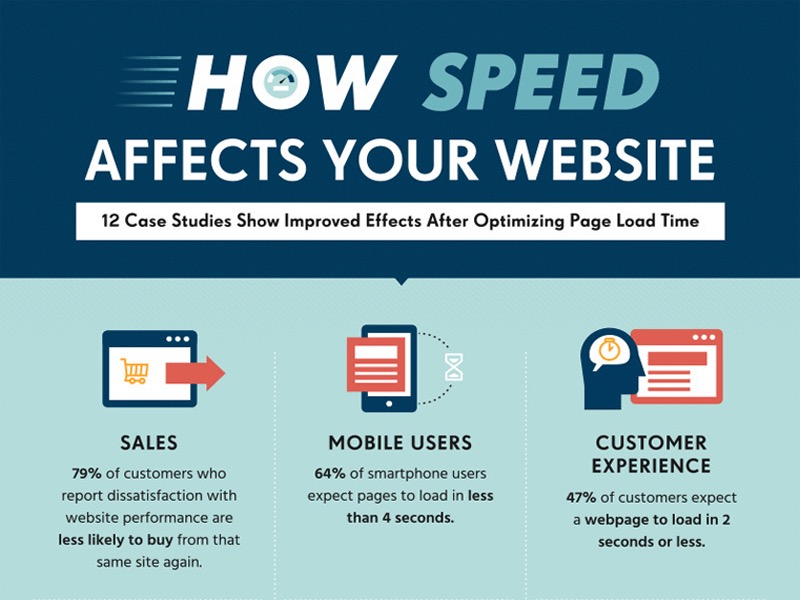
Website performance plays a very important role in today’s digital world. A slow website not only frustrates users but also affects search engine rankings, conversions, and overall brand trust. Whether you run a blog, business website, or an online platform, improving website performance is essential for long-term success.
Why Website Performance Matters
Website performance is not just about speed; it is about user experience, reliability, and efficiency.
A well-performing website:
- Loads faster on all devices
- Keeps users engaged for longer
- Improves SEO rankings
- Increases conversions and leads
- Reduces bounce rate
Search engines also prefer fast and stable websites, which means performance directly impacts visibility.
Common Reasons for Poor Website Performance
Before improving performance, it’s important to understand what slows a website down.
1. Heavy Images and Media Files
Large images and uncompressed videos consume more bandwidth and increase loading time.
2. Poor Server Performance
Low-quality hosting or overloaded servers can delay page responses.
3. Too Many Scripts and Plugins
Unnecessary JavaScript files, CSS files, and plugins slow down rendering.
4. No Caching Mechanism
Without caching, the server processes every request from scratch.
5. Unoptimized Code
Messy HTML, CSS, and JavaScript increase page size and load time.
Practical Ways to Improve Website Performance
1. Optimize Images Properly
Images should always be optimized before uploading.
Best practices:
- Use modern formats like WebP
- Compress images without losing quality
- Load images only when needed (lazy loading)
This alone can reduce page size significantly.
2. Use Caching Smartly
Caching stores a ready version of your website so it loads faster for returning users.
Types of caching:
- Browser caching
- Server-side caching
- Database query caching
Caching reduces server load and improves response time.
3. Minify CSS, JavaScript, and HTML
Minification removes unnecessary spaces, comments, and characters from code.
Benefits:
- Smaller file size
- Faster downloads
- Quicker page rendering
Clean code always performs better.
4. Reduce HTTP Requests
Every file requested by the browser increases loading time.
You can reduce requests by:
- Combining CSS files
- Combining JavaScript files
- Removing unused libraries
Fewer requests mean faster page loads.
5. Choose Quality Hosting
Your hosting provider plays a major role in performance.
Good hosting should offer:
- Fast SSD storage
- Adequate RAM and CPU
- High uptime
- Good server location
Cheap hosting often becomes expensive later due to poor performance.
6. Enable Content Delivery Network (CDN)
A CDN delivers your website content from servers closest to the user’s location.
Advantages:
- Faster global loading speed
- Reduced server stress
- Better availability
CDNs are especially helpful for large or international websites.
7. Optimize Database Performance
Databases grow over time and need regular maintenance.
Helpful steps:
- Remove unnecessary data
- Optimize database tables
- Use indexes correctly
A healthy database keeps your website fast and stable.
8. Improve Mobile Performance
Most users visit websites on mobile devices.
To improve mobile performance:
- Use responsive design
- Reduce heavy animations
- Optimize fonts and layouts
Mobile optimization is no longer optional.
9. Limit Third-Party Scripts
Analytics, ads, chat widgets, and trackers can slow down your site.
Best approach:
- Use only necessary third-party tools
- Load scripts asynchronously
- Regularly review their impact
Less dependency means better control.
10. Monitor Performance Regularly
Performance optimization is not a one-time task.
You should regularly:
- Test page speed
- Monitor server response
- Check error logs
- Fix performance issues early
Consistent monitoring ensures long-term stability.
Simple Performance Improvement Checklist
| Area | What to Do |
|---|---|
| Images | Compress and lazy load |
| Code | Minify and clean |
| Hosting | Use reliable servers |
| Caching | Enable browser and server caching |
| Scripts | Remove unused plugins |
| Database | Optimize regularly |
| Mobile | Focus on responsive speed |