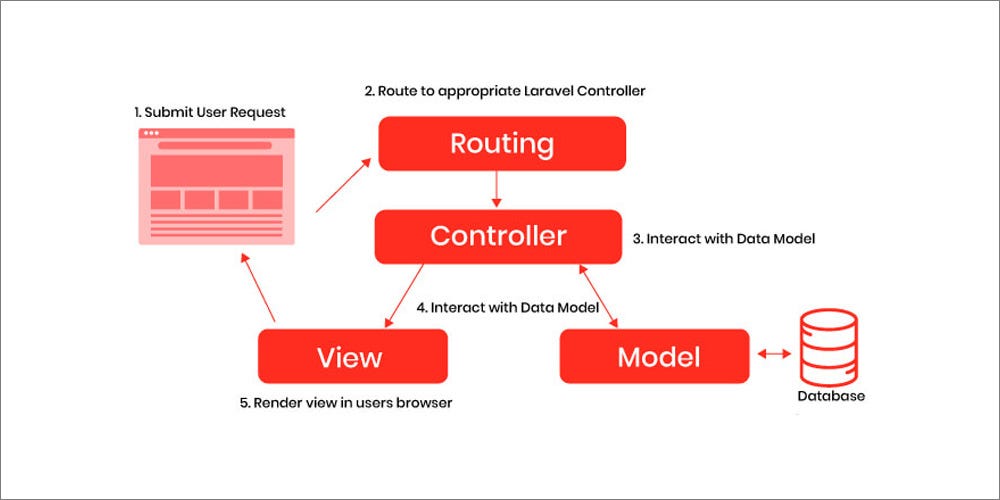
Laravel is powerful, but as a project grows, performance can drop because of slow queries, extra API calls, heavy views, unnecessary middleware, and poor caching. The good news is: Laravel performance can be improved a lot without changing the whole system, just by fixing the right bottlenecks.
Why Laravel Projects Become Slow
Most Laravel performance issues come from:
- N+1 queries (too many database queries in loops)
- No caching (same data fetched again and again)
- Slow database design (missing indexes, heavy joins)
- Heavy Blade rendering (large pages, repeating components)
- Unoptimized API calls (calling external services repeatedly)
- Session / auth overhead (too much work on every request)
1) Start With Measurement (Don’t Guess)
Before optimization, identify where time is spent:
What to check:
- Response time (TTFB)
- DB query count and slow queries
- Cache hit/miss
- Queue vs sync tasks
- Memory usage
Example (quick timing in controller):
$start = microtime(true);

// your logic...

\Log::info("Time taken: " . (microtime(true) - $start) . " seconds");
2) Fix N+1 Queries (Most Common Performance Killer)
Bad example:
$posts = Post::all();

foreach ($posts as $post) {
    echo $post->user->name; // triggers query per post
}
Good example (Eager loading):
$posts = Post::with('user')->get();

foreach ($posts as $post) {
    echo $post->user->name;
}
Result: Database queries drop drastically.
3) Use Pagination Instead of Loading Everything
Bad:
$users = User::all();
Good:
$users = User::paginate(20);
This reduces memory usage and speeds up responses.
4) Add Database Indexes (Huge Impact)
If you filter/search by columns frequently, indexing is critical.
Example: add index in migration
Schema::table('users', function (Blueprint $table) {
    $table->index('email');
});
Where indexes help most:
WHEREfiltersORDER BYfields- foreign keys (
user_id,doctor_id) - slugs (
slug,username)
5) Cache Repeated Data (Use Cache::remember)
If the same data is used frequently (countries list, categories, settings, etc.), cache it.
Example:
$data = Cache::remember('countries_list', 3600, function () {
    return Country::orderBy('name')->get();
});
Tip: Cache for 10 minutes to 1 hour depending on update frequency.
6) Cache Full Responses (When Suitable)
For pages like home, listing, static sections, or heavy landing pages:
Route::get('/home', function () {
    return Cache::remember('home_page', 60, function () {
        return view('home');
    });
});
This works very well for high traffic pages.
7) Use Queues for Heavy Tasks (Don’t Do Everything in Request)
Email sending, PDF generation, large imports, image processing should run in background.
Example: dispatch a job
SendWelcomeEmailJob::dispatch($user);
Queue driver setup (recommended):
- Redis or database queue
- Supervisor for workers
Benefit: Request becomes fast, job runs asynchronously.
8) Optimize Blade Views
Blade can become slow if:
- large loops render heavy HTML
- repeated queries inside views (avoid this)
- components render heavy data repeatedly
Best practices:
- Move DB logic to controller/service
- Use view caching for heavy sections
- Use pagination and lazy loading on UI
Example (avoid queries in Blade):
{{-- BAD --}}
@php $users = \App\Models\User::all(); @endphp
Instead, pass $users from controller.
9) Optimize API Calls (Avoid Repeated Remote Requests)
If your Laravel service calls another API again and again:
- cache the token
- cache API responses
- use retry + timeout
Example: cache external API response
$doctors = Cache::remember('premium_doctors', 120, function () {
    return Http::timeout(3)->get('https://example.com/api/doctors')->json();
});
10) Reduce Middleware Load
Some middleware runs on every request:
- auth checks
- token introspection
- session refresh
- logging
Improvement ideas:
- Apply middleware only to needed routes
- Separate public and private route groups
- cache SSO introspection results for short time (30–120 sec)
11) Use OPcache and Proper PHP Settings (Server Side)
For production performance:
- Enable OPcache
- Increase memory wisely
- Use PHP-FPM tuning
This is often a major boost, especially on high traffic.
12) Use Laravel Optimization Commands (Production Must)
Run these on deployment:
php artisan config:cache
php artisan route:cache
php artisan view:cache
php artisan event:cache
Note: If your app changes config dynamically, use carefully.
Performance Improvement Table
| Area | Common Problem | Fix |
|---|---|---|
| Database | N+1 Queries | Eager Loading |
| Database | Slow WHERE filters | Add Index |
| Controllers | Heavy processing | Move to Jobs/Queues |
| Views | Queries inside Blade | Move to Controller |
| External APIs | Repeat requests | Cache response/token |
| Routing | Too many routes unoptimized | Route cache |
| Config | Env lookups every request | Config cache |
| Static pages | Regenerated every time | Response cache |
Real-World Example: Faster “Doctors Listing” Page
Problem symptoms:
- Slow list page
- Too many API calls
- repeated DB queries
- heavy images + UI rendering
Fix plan:
- Use pagination for doctors list
- Cache doctors response for 1–2 minutes
- Lazy-load sections (load on scroll/click)
- Add index on doctor slug/speciality/city
- Reduce Blade loops and nested components
This kind of optimization gives immediate results.
Conclusion
Laravel performance improvement is a mix of:
- query optimization
- proper caching
- queues for heavy work
- clean Blade usage
- server tuning
- monitoring continuously
If you apply just these 7 high-impact fixes:
- Fix N+1
- Add indexes
- Use pagination
- Cache repeated data
- Use queues
- Cache config/routes/views
- Reduce middleware overhead
…your Laravel project will feel much faster and more stable.