Site Reliability Engineering (SRE) is a software engineering approach to running and maintaining reliable production systems. Rather than treating operations as manual ticket handling or routine server babysitting, SRE applies software engineering principles, automation, and measurable service objectives to keep applications available, responsive, and resilient as they change.
Modern businesses depend on software around the clock. When a payment API times out during a sale, a ride-booking app stalls during peak commute hours, or a cloud dashboard throws repeated 500 errors, users feel the friction immediately. Outages cost revenue, erode customer trust, and pull engineering teams away from building new capabilities into reactive firefighting.
In this guide, you will learn what Site Reliability Engineering means in practice, how it evolved, and how core concepts like SLIs, SLOs, SLAs, error budgets, observability, and toil reduction fit together. Whether you are a student, developer, system administrator, cloud engineer, or engineering manager, this walkthrough gives you a practical mental model for how reliability is engineered and measured.
Understanding Site Reliability Engineering: Definition and Fundamentals
At its core, Site Reliability Engineering answers a straightforward operational question: how do we keep complex software systems running reliably for real users while still shipping improvements regularly?
The meaning of SRE lies in treating reliability as an engineering discipline rather than an informal hope or a manual checklist. A formal definition of SRE describes it as a practice that uses software engineering to solve infrastructure and operations problems, automate repetitive work, and manage system risk through clear reliability targets.
How SRE Combines Software Engineering and IT Operations
Historically, software developers focused on writing features and shipping code, while IT operations teams focused on keeping servers running and handling incidents. That split often created friction: developers wanted frequent changes, while operations teams pushed back to protect stability.
SRE bridges this gap by hiring or training engineers who write code, understand system internals, and take shared accountability for production health. Instead of fixing the same recurring alert by hand every week, an SRE writes code or automation to eliminate the underlying cause or handle recovery automatically.
Main Objectives and How Reliability Becomes an Engineering Responsibility
An SRE team’s primary objectives typically include:
- Protecting user-facing reliability: Keeping availability, latency, and error rates aligned with user expectations.
- Enabling sustainable change: Letting product teams ship updates safely without burning out on-call engineers.
- Eliminating repetitive manual work (toil): Replacing routine, low-value operational tasks with software and automation.
- Improving visibility and recovery: Building clear telemetry, tested runbooks, and fast incident response workflows.
When reliability is an engineering responsibility, teams ask architectural and operational questions early: What happens if a database node restarts? How do we roll back a bad release in minutes? Which metrics prove a user checkout actually succeeded?
A Simple Everyday Example: Metro or Train Commute Reliability
Imagine planning a daily train or metro commute to work. You care about two practical things: whether trains run and whether they get you there within a reasonable window. If a train breaks down occasionally, the system might still feel acceptable if delays are rare and recovery is fast. If trains stall every morning without clear announcements or backup options, commuters lose trust and switch alternatives.
SRE works similarly for a digital service. Users do not care whether your backend runs on virtual machines or Kubernetes pods; they care whether pages load quickly, logins succeed, and transactions complete without errors.
How Site Reliability Engineering Evolved
To appreciate why SRE exists, it helps to look at how infrastructure and software delivery changed over the last two decades.
Traditional System Administration and Manual Operations
In traditional IT operations, system administrators often provisioned servers manually, SSH’d into machines to inspect logs or apply patches, and followed long runbooks whenever something broke. That approach worked reasonably well when applications were monolithic, release cycles happened every few weeks or months, and server counts were modest.
As traffic grew and deployments became more frequent, manual operations ran into clear limits:
- Configuration drift crept in when servers were tweaked by hand.
- Humans made mistakes under time pressure during late-night incidents.
- Ticket queues grew faster than teams could resolve routine requests.
Distributed Applications and Google’s Approach
As web services scaled to millions of concurrent users across distributed servers, failures became normal rather than rare. Disks fail, network links flap, caches fill up, and dependencies slow down.
Google formalized Site Reliability Engineering to run large-scale production systems using software engineering rather than pure manual operations. Google’s published SRE literature introduced practical mechanisms—such as Service Level Objectives (SLOs), error budgets, toil limits, and blameless postmortems—that gave engineering organizations a structured way to manage risk and scale operations.
Evolution and Modern Industry Adoption
Over time, SRE practices spread far beyond their original context. Cloud platforms, container orchestration with Kubernetes, microservices architectures, and continuous delivery pipelines made automated, observable operations essential for organizations of many sizes.
It is helpful to separate two things as you read about SRE:
- Established SRE practices: Concepts such as defining SLIs and SLOs, tracking error budgets, reducing toil, running incident response, and writing postmortems are widely documented and practiced across modern engineering teams.
- Broader industry interpretation: Different companies adapt SRE differently. Some build dedicated SRE teams aligned to critical platforms; others embed reliability practices inside platform or product engineering teams. In some job listings, “SRE” is also used loosely for traditional infrastructure or cloud operations roles—so reading role expectations carefully matters.
The SRE Philosophy: Balancing Reliability and Innovation
SRE is guided by a practical set of trade-offs rather than perfectionism.
Core Ideas Behind SRE
- Reliability as a measurable objective: Reliability is defined through concrete indicators and targets rather than vague promises like “high uptime”.
- Engineering-driven operations: Operational problems are solved through software, systems design, and automation where possible.
- Shared responsibility: Product developers, SREs, platform engineers, and security teams share ownership of building and operating healthy systems.
- Automation over repetitive manual work: Repetitive tasks that do not require human judgment should be automated or eliminated.
- Continuous improvement: Systems and processes evolve through iterative feedback, testing, and post-incident learning.
- Data-driven decision-making: Telemetry, error budgets, and trend data guide prioritization rather than guesswork.
- Learning from failures: Outages and near-misses are treated as learning opportunities to strengthen systems and workflows.
- Balancing feature development with system stability: Shipping new features matters, and protecting user experience matters too—both must be balanced intentionally.
Why 100% Reliability Is Often the Wrong Target
Pursuing 100% reliability sounds noble, but in practice it is rarely achievable or cost-effective for user-facing software. Every additional “nine” of availability demands more redundancy, complexity, and cost, while external networks, client devices, and upstream dependencies remain outside a single team’s control. Worse, freezing all changes to avoid risk can stall product progress.
Why SRE Is Not Just Another Name for System Administration
System administration focuses heavily on managing servers, operating systems, storage, and infrastructure maintenance. While SRE relies on strong systems fundamentals, its defining trait is using software engineering, service-level targets, error budgets, and proactive risk management to govern how systems behave and evolve.
The Core Reliability Framework: SLI, SLO and SLA
Three terms sit at the center of reliability management: SLI, SLO, and SLA. They are closely connected, but they serve distinct purposes.
Service Level Indicator (SLI)
A Service Level Indicator (SLI) is a quantitative measure of some aspect of the level of service provided to users. Good SLIs reflect user experience rather than raw server internals alone. Common examples include:
- Availability: The proportion of valid requests that succeed (for example, HTTP requests returning a non-5xx response or meeting success criteria).
- Latency: The proportion of requests completed faster than a chosen threshold (such as responses under 300 milliseconds), often tracked using percentiles like p95 or p99 rather than a plain average.
- Error rate: The fraction of requests that fail or return errors.
- Throughput: The rate of requests or transactions processed over time (such as requests per second).
Service Level Objective (SLO)
A Service Level Objective (SLO) is a target value or range for a service level measured by an SLI over a specific time window (such as 7 days or 28 or 30 days). An SLO turns a raw metric into an internal engineering goal: our checkout API should achieve 99.9% successful requests over a rolling 28-day window.
Service Level Agreement (SLA)
A Service Level Agreement (SLA) is an external or contractual commitment—often between a service provider and a customer—that defines expected service levels and consequences (such as service credits) if targets are missed. Because breaching an SLA carries contractual impact, internal SLOs are typically set tighter than external SLAs so teams get early warning before an SLA violation occurs.
SLI vs. SLO vs. SLA Comparison
| Dimension | Service Level Indicator (SLI) | Service Level Objective (SLO) | Service Level Agreement (SLA) |
|---|---|---|---|
| What it is | A measured metric or ratio of service quality | An internal reliability target for an SLI over a window | A formal or contractual commitment with consequences |
| Primary owners | SREs and service engineers | Product, engineering, and SRE leadership | Business, legal, product, and support/SRE teams |
| Role in decision-making | Shows how the system is actually performing | Guides release pace, alerting, and reliability work | Defines external expectations and remedies |
| Example | Share of search requests completing under 250 ms | 99.9% of search requests under 250 ms over 28 days | 99.5% monthly uptime or contractual credit |
Hypothetical Example: Defining and Measuring Availability
Note: The following figures are a hypothetical example created to illustrate how SLIs and SLOs work.
Suppose an internal order-status API serves 1,000,000 valid requests over a 28-day window. The team defines:
- SLI: Percentage of valid HTTP requests to
/orders/statusthat return a successful200 OKresponse. - SLO: 99.9% availability over a rolling 28-day window.
If 999,400 requests succeed and 600 fail during the 28-day period, the measured SLI is 999,400 / 1,000,000 = 99.94%. Because 99.94% is above the 99.9% target, the SLO is met for that window.
Error Budgets: Managing the Balance Between Reliability and Change
An error budget is the allowable amount of unreliability permitted by a service’s SLO over a given window. Mathematically, if your SLO is 99.9%, your error budget is 100% - 99.9% = 0.1% of allowed failure over that period.
Why Error Budgets Matter and How Teams Use Them
Error budgets give teams a shared, objective currency for risk. Instead of arguing abstractly about whether a release is “too risky,” teams can look at how much error budget remains:
- When plenty of budget remains: Teams can ship features, experiment, and roll out changes at a healthy pace.
- When budget is burning quickly: Teams investigate what is consuming reliability—whether a recent deployment, a traffic spike, or an underlying dependency—and slow risky changes.
- When the error budget is exhausted: Many organizations enforce an error budget policy that pauses non-essential feature releases and prioritizes reliability fixes, resilience testing, and toil reduction until headroom recovers.
This shared mechanism aligns product managers, developers, and SREs around user experience rather than turning reliability into a tug-of-war.
Numerical Error Budget Example
Assumptions: Assume a hypothetical web service has an availability SLO of 99.9% over a 28-day window, with 10,000,000 total valid requests expected across those 28 days (and note that 28 days = 40,320 minutes).
- Allowed failure rate:
100% - 99.9% = 0.1%(0.001). - Error budget in failed requests:
10,000,000 × 0.001 = 10,000failed requests over the 28-day window. - Equivalent time budget (if full downtime):
0.001 × 40,320 minutes = 40.32 minutesover 28 days.
Suppose halfway through the window, a faulty release and a brief database slowdown cause 4,500 failed requests. The team has used 45% of its 28-day error budget (4,500 / 10,000) and still has 5,500 failed requests of budget remaining for the rest of the window.
Inside an SRE Team: Roles, Responsibilities and Daily Work
Day-to-day SRE work blends hands-on engineering with operational discipline. Typical responsibilities include:
- Service reliability: Defining SLIs and SLOs with product owners and tracking reliability trends.
- Production operations: Participating in on-call rotations, triaging alerts, and keeping production healthy.
- Monitoring: Building actionable alerts, dashboards, and service health checks.
- Incident response: Coordinating mitigation, restoring service quickly, and keeping stakeholders informed.
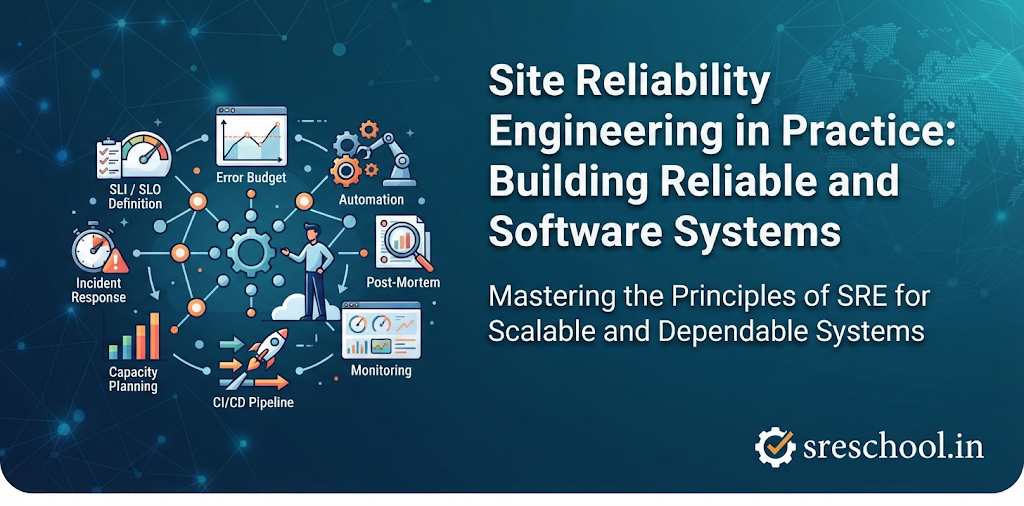
- Automation: Writing scripts, operators, pipelines, and infrastructure code to automate repeatable tasks.
- Capacity planning: Forecasting traffic growth, scaling resources ahead of demand, and running load tests.
- Performance optimization: Identifying latency bottlenecks, resource contention, and inefficient queries.
- Release support: Supporting progressive rollouts, canary checks, and safe rollbacks.
- Reliability reviews: Participating in architectural and launch readiness reviews before major releases.
- Disaster recovery planning: Testing backups, failover procedures, and regional recovery plans.
Working Across Engineering Teams
SREs rarely work in isolation. They partner closely with software developers on instrumentation, timeouts, retries, and graceful degradation; with platform engineers on shared deployment and runtime tooling; with security teams on vulnerability patching, secrets, and access controls; and with infrastructure engineers on cloud networking, compute, and storage.
Essential SRE Practices for Reliable Systems
Strong SRE teams rely on a set of practical habits that reinforce one another:
- Monitoring and alerting: Collecting system and application signals and paging humans only when user impact or urgent intervention requires action.
- Observability: Instrumenting systems so engineers can ask new questions about unfamiliar production behavior using telemetry.
- Incident management: Using clear roles, communication channels, and escalation paths so teams resolve incidents methodically.
- On-call management: Structuring rotations, alert routing, and handoffs so on-call load stays fair and sustainable.
- Blameless postmortems: Reviewing incidents to uncover systemic and process factors—without blaming individuals—and tracking concrete follow-up fixes.
- Automation: Replacing manual provisioning, configuration, and recovery steps with repeatable code.
- Toil reduction: Identifying manual, repetitive, automatable operational work that scales linearly with service growth, and reducing it over time.
- Capacity planning: Modeling demand against compute, memory, network, and database limits to avoid surprise saturation.
- Performance engineering: Benchmarking and tuning system responsiveness under realistic load.
- Change management: Using progressive delivery, automated checks, and fast rollbacks because changes are a leading cause of production incidents.
- Disaster recovery: Practicing backup restoration and failover so teams know recovery works before a real outage.
- Chaos engineering: Running controlled fault-injection experiments to uncover weak assumptions and verify resilience.
The SRE Technology Stack: Tools Used in Reliability Engineering
Tools support SRE workflows, but no single tool automatically makes a system reliable. Teams choose tools that fit their architecture and pair them with clear engineering practices.
| Category | Example Tools | How They Support Reliability Workflows |
|---|---|---|
| Monitoring | Prometheus, Datadog | Collect time-series metrics, evaluate alert rules, and track service health |
| Visualization | Grafana | Build dashboards for latency, error rates, saturation, and SLO burn |
| Logging | Elasticsearch, OpenSearch | Aggregate, index, and search event logs during debugging and audits |
| Distributed Tracing | Jaeger, Zipkin | Follow requests across services to pinpoint slow calls and bottlenecks |
| Observability | OpenTelemetry | Standardize instrumentation, context propagation, and telemetry collection across services |
| Incident Management | PagerDuty, Opsgenie | Route alerts to on-call responders, manage escalations, and track incident timelines |
| Container Orchestration | Kubernetes | Schedule containers, manage health checks, and scale workloads across nodes |
| Automation | Ansible, Terraform | Automate configuration management and declarative infrastructure provisioning |
| CI/CD | Jenkins, GitLab CI/CD | Automate testing, building, and progressive deployments to production |
| Cloud Platforms | AWS, Azure, Google Cloud | Provide managed compute, networking, availability zones, and reliability primitives |
| Load Testing | k6, JMeter | Simulate traffic spikes and measure latency and throughput limits before release |
| Chaos Engineering | LitmusChaos, Chaos Mesh | Inject controlled faults—such as pod or network disruptions—to test resilience |
Monitoring, Observability and Incident Response in Practice
Monitoring vs. Observability
Monitoring focuses on watching known metrics and thresholds—like CPU utilization, disk space, or HTTP error counts—to detect when a system crosses expected boundaries. Observability is a property of a system that lets you infer its internal state from external outputs (telemetry) even when facing unfamiliar failure modes.
Metrics, Logs and Traces
- Metrics: Numeric measurements aggregated over time (such as request counts, error ratios, and latency histograms). They are compact and ideal for dashboards, SLO tracking, and alerting.
- Logs: Timestamped records of discrete events—structured or unstructured—capturing application errors, state transitions, and operational messages.
- Traces: End-to-end records of a single request’s path across distributed services (made of spans), showing where time is spent across network hops and dependencies.
Alerting, Investigation, Root Cause Analysis and Postmortems
Effective alerts tie closely to user impact or rapid error-budget burn rather than firing on every minor resource blip. During an incident, responders check dashboards and SLO burn first to confirm scope, narrow down affected services or recent changes, inspect correlated logs and traces, and mitigate user impact quickly—often via rollback, scaling, or configuration change—before digging deeper.
After stabilization, a blameless postmortem documents the timeline, contributing factors, what worked well, and concrete action items with owners and due dates.
Illustrative Example: Diagnosing a Production Latency Spike
Note: This is an illustrative diagnostic walkthrough, not a real production incident.
Suppose an on-call engineer receives a high-burn latency alert on an API gateway: p99 response time jumped from 180 ms to 1,900 ms across 12% of traffic. Checking the service dashboard shows gateway CPU is normal, ruling out simple CPU saturation. A trace of a slow request shows 1,650 ms spent inside a downstream payment-verification call rather than the gateway itself. Filtering payment-service logs for the same trace ID reveals connection-pool exhaustion after a recent deployment introduced unpooled database connections under load. The team rolls back the release to restore normal latency, then adds connection-pool limits and a pre-release load test as follow-up actions.
SRE in Action: A Practical Reliability Engineering Scenario
Disclaimer: The scenario below is a hypothetical, illustrative example designed to show how SRE practices connect end-to-end. It is not a real customer case study.
Imagine a high-traffic ticket-booking web application preparing for major event launches. Here is how an SRE team might apply reliability engineering step by step:
- Defining service reliability requirements: Product, engineering, and SRE leads agree that checkout and ticket reservation must stay fast and dependable during traffic surges.
- Selecting meaningful SLIs: They pick two primary SLIs at the load balancer/API layer: checkout availability (successful
2xxresponses over valid checkout requests) and checkout latency (proportion of requests completing under500 ms). - Establishing an SLO: They set a 28-day SLO of
99.9%for checkout availability and99.5%for sub-500 mslatency, paired with an error budget policy. - Configuring monitoring and alerts: They collect metrics in Prometheus, visualize them in Grafana, trace requests with OpenTelemetry, and configure multi-window burn-rate alerts routed via PagerDuty.
- Detecting a performance problem: Ten minutes into a ticket sale, a fast-burn alert fires because checkout errors hit
1.8%and latency climbs past800 ms. - Responding to an incident: The on-call SRE opens the incident channel, assigns an incident commander and communications lead, and checks recent changes.
- Investigating the underlying cause: Traces and logs show a newly deployed seat-hold service retrying failed cache reads aggressively, overwhelming a Redis cluster.
- Restoring normal service: The team rolls back the seat-hold deployment and caps retry attempts, bringing error rates and latency back within normal bounds within 18 minutes.
- Preparing a postmortem: Within two days, the team writes a blameless postmortem detailing the timeline, retry amplification, and error budget consumed.
- Improving the system to prevent recurrence: They add exponential backoff with jitter, enforce circuit breakers or rate limits on retries, and run a load test before the next sale.
SRE vs DevOps vs Traditional IT Operations
Engineers often ask how Site Reliability Engineering, DevOps, Platform Engineering, and Traditional IT Operations relate. In practice, DevOps describes cultural and technical goals for faster, safer software delivery, while SRE implements concrete reliability engineering practices. Platform Engineering focuses on building internal self-service platforms and golden paths that reduce cognitive load for application developers.
| Comparison Aspect | Site Reliability Engineering (SRE) | DevOps | Platform Engineering | Traditional IT Operations |
|---|---|---|---|---|
| Primary focus | System reliability, risk balance, and sustainable operations | Fast, reliable software delivery and cross-team flow | Internal developer platforms and self-service tooling | Maintaining infrastructure, servers, and day-to-day stability |
| Team responsibilities | SLIs/SLOs, error budgets, incident response, toil automation | CI/CD, collaboration, shared delivery ownership, feedback loops | Paved roads, reusable templates, runtime and deployment abstractions | Provisioning, patching, ticket handling, hardware/OS support |
| Automation | High—automates operations, scaling, and toil reduction | High—automates build, test, and release pipelines | High—provides automated self-service workflows for teams | Lower—historically manual or script-assisted tasks |
| Reliability measurement | SLIs, SLOs, error budgets, MTTD/MTTR, toil share | DORA metrics (deployment frequency, lead time, change fail rate, MTTR) | Platform adoption, lead time reduction, platform uptime | Ticket counts, server uptime, hardware/SLA checks |
| Software delivery | Governed by error budgets and safe rollout practices | Continuous integration and continuous delivery | Enabled via standardized CI/CD and environment templates | Often periodic or ticket-gated release windows |
| Operational practices | On-call, blameless postmortems, chaos/load testing | Trunk/branch workflows, automated testing, rapid feedback | Documentation, APIs, managed infrastructure components | Runbooks, maintenance windows, manual escalations |
| Collaboration | Partners with Dev, Platform, Security, and Infra teams | Breaks silos between Dev and Ops | Treats internal developers as platform users/customers | Often separated from application development teams |
SRE and DevOps work well together when treated as complementary rather than competing. As DORA research has highlighted, delivery speed and system stability reinforce one another when teams build sound engineering habits rather than treating speed and safety as opposite poles.
Common SRE Challenges and How Teams Address Them
Adopting reliability practices brings real operational hurdles:
- Excessive operational toil: Track manual tasks over time, quantify hours spent, and automate the highest-volume repetitive tasks first.
- Alert fatigue: Tune alerts around user impact and error-budget burn, remove noisy low-value alerts, and keep runbooks accurate.
- Unclear SLOs: Start with a few user-centered SLIs and realistic targets based on historical data rather than guessing arbitrary numbers.
- Frequent production incidents: Pair progressive rollouts and automated checks with blameless postmortems that fix systemic root causes.
- Poor monitoring coverage: Standardize telemetry with OpenTelemetry and ensure critical user journeys have metrics, logs, and traces.
- Capacity management problems: Monitor resource saturation, run load tests ahead of peak traffic, and configure autoscaling and quotas safely.
- Unreliable deployments: Use canary or phased rollouts, automated health checks, and fast rollback paths.
- Distributed system complexity: Design for timeouts, controlled retries, idempotency, and graceful degradation across dependencies.
- Inadequate incident communication: Define clear roles, status updates, and escalation paths during active incidents.
- Lack of automation: Adopt Infrastructure as Code, CI/CD pipelines, and repeatable runbook automation incrementally.
Building an SRE Practice: An Organizational Adoption Roadmap
Trying to adopt every SRE practice overnight rarely works. Organizations get better results by matching practices to their current operational maturity.
- Understand current reliability problems: Audit recent incidents, recurring alerts, and manual bottlenecks.
- Identify critical services: Focus first on customer-facing or revenue-critical services rather than every internal tool.
- Define service ownership: Clarify who owns reliability, alerting, and escalation for each service.
- Establish meaningful SLIs: Measure user-facing availability, latency, and error rates.
- Set realistic SLOs: Choose achievable targets over defined windows that reflect real user needs.
- Introduce error budgets: Connect SLOs to release and reliability trade-offs.
- Improve monitoring and alerting: Build clear dashboards and reduce noisy alerts.
- Establish incident response procedures: Document roles, severity levels, and response workflows.
- Reduce operational toil: Log repetitive manual tasks and eliminate recurring toil.
- Introduce automation: Automate deployments, infrastructure provisioning, and recovery actions.
- Conduct blameless postmortems: Run structured reviews after incidents and track action items to completion.
- Review and improve reliability continuously: Revisit SLOs, alert thresholds, and system resilience as traffic and architecture evolve.
Measuring Reliability: Important SRE Metrics and KPIs
Metrics help teams see whether reliability is improving, but every metric has trade-offs when viewed in isolation.
| Metric / KPI | What It Measures | How Teams Use It | Limitations to Keep in Mind |
|---|---|---|---|
| Availability | Share of valid requests or periods operating successfully | Tracks whether users can complete core actions | High availability can still hide slow or degraded responses |
| Latency | Time taken to serve requests (often as percentiles like p95/p99) | Detects slowdowns and tail-latency bottlenecks | Averages mask bad experiences for slow outlier requests |
| Error Rate | Share of requests resulting in errors or failures | Flags broken endpoints, bad deploys, or dependency faults | Silent failures or wrong data may not show as HTTP errors |
| Throughput | Volume of requests or work processed per unit of time | Supports capacity planning and traffic trend analysis | Low throughput during quiet hours can distort error percentages |
| SLO Compliance | Whether a service met its target SLO over a window | Evaluates overall reliability performance across periods | Targets set too loose or too tight give misleading signals |
| Error Budget Consumption | How much of the allowed unreliability budget has been spent | Guides release pace, risk tolerance, and reliability sprints | Requires accurate SLIs and agreement on policy actions |
| MTTD (Mean Time to Detect) | Average/typical time from issue start to detection | Measures monitoring and alerting responsiveness | Hard to pinpoint exact start time of gradual degradations |
| MTTR (Mean Time to Restore) | Time taken to restore normal service after an incident | Measures incident response, rollback, and recovery speed | Averages are skewed by rare long outages; medians/percentiles help |
| Incident Frequency | How often incidents occur over a given period | Tracks stability trends and recurring problem areas | Fewer incidents can still mean longer or higher-impact outages |
| Toil Percentage | Share of engineering time spent on manual, repetitive toil | Tracks progress toward automating routine operational work | Categorizing tasks consistently across engineers takes discipline |
No single metric is a universal target for every team—context and balanced indicators matter most.
Skills and Career Opportunities in Site Reliability Engineering
Technical and Professional Skills Needed
- Linux administration: Navigating filesystems, processes, permissions, networking tools, and system logs.
- Networking: Understanding DNS, TCP/IP, HTTP/HTTPS, load balancing, firewalls, and latency across hops.
- Programming and scripting: Writing automation, tooling, health checks, and small services in languages such as Python, Go, or shell scripts.
- Cloud infrastructure: Working with compute, storage, VPC networking, IAM, and multi-zone/multi-region resilience on AWS, Azure, or Google Cloud.
- Distributed systems: Reasoning about timeouts, retries, queues, caching, consensus, and partial failures.
- Kubernetes: Managing deployments, services, ingress, autoscaling, resource requests/limits, and cluster troubleshooting.
- Monitoring and observability: Working with Prometheus, Grafana, OpenTelemetry, logs, and traces.
- Incident management: Staying calm during incidents, following runbooks, communicating clearly, and writing blameless postmortems.
- Automation & Infrastructure as Code: Using tools like Terraform and Ansible alongside CI/CD pipelines.
- Performance troubleshooting & reliability principles: Applying SLIs, SLOs, error budgets, and root-cause analysis.
Career Paths and Roles
- Site Reliability Engineer: Focuses on SLIs/SLOs, automation, observability, incident response, and production stability.
- Senior SRE: Leads complex reliability initiatives, mentors peers, designs resilience patterns, and drives cross-team standards.
- Cloud Reliability Engineer: Specializes in resilient cloud architectures, failover, quotas, and cloud-native operations.
- Production Engineer: Works closely with application and infrastructure layers to keep high-scale production services healthy.
- Platform Engineer: Builds internal developer platforms, golden paths, and self-service deployment/observability capabilities.
- Reliability Architect: Shapes system-wide architecture for high availability, fault isolation, and disaster recovery.
- SRE Team Lead: Guides on-call health, error budget governance, hiring/mentoring, and reliability roadmaps.
How to Start Learning Site Reliability Engineering
A steady, hands-on progression helps beginners build real operational confidence without getting overwhelmed:
- Stage 1: Linux and System Administration — Learn shell commands, permissions, systemd services, process/memory inspection, and log analysis. Practice project: Set up a Linux VM, host a basic web service, and inspect CPU, memory, and disk behavior under load.
- Stage 2: Networking and Application Fundamentals — Study HTTP status codes, DNS resolution, TLS, reverse proxies, and REST APIs. Practice project: Configure a reverse proxy in front of a backend service and inspect request headers and response times.
- Stage 3: Programming and Scripting — Learn enough Python, Go, or Bash to automate file/API tasks, parse JSON logs, and write small utilities. Practice project: Write a script that checks endpoint health, logs latency, and alerts on failures.
- Stage 4: Git and CI/CD — Practice branching, pull requests, automated tests, and deployment pipelines. Practice project: Build a CI/CD pipeline that runs automated checks and deploys a sample app.
- Stage 5: Cloud Infrastructure — Learn virtual networks, compute instances, managed databases, IAM, and availability zones. Practice project: Provision a small multi-subnet web deployment using Infrastructure as Code like Terraform.
- Stage 6: Docker and Kubernetes — Containerize applications and deploy them on Kubernetes with health probes, ConfigMaps, and scaling. Practice project: Deploy a multi-container app on a local or cloud Kubernetes cluster and simulate a pod crash to observe recovery.
- Stage 7: Monitoring and Observability — Instrument a service with OpenTelemetry, collect metrics with Prometheus, and build Grafana dashboards. Practice project: Expose request count and latency metrics from a sample app and graph p95 latency and error rate.
- Stage 8: SLIs, SLOs and Error Budgets — Define user-facing SLIs, set a sample SLO, and calculate error budget burn. Practice project: Write a short one-page SLO specification and error budget policy for a sample service.
- Stage 9: Incident Management and Automation — Practice incident timelines, runbooks, postmortem writing, and automating repetitive tasks. Practice project: Inject a simulated failure in a lab environment, document your response timeline, and write a blameless postmortem.
- Stage 10: Distributed Systems and Reliability Engineering — Study retries, timeouts, circuit breakers, rate limiting, and chaos experiments. Practice project: Add timeouts and retries to a service call and test how the system behaves when a downstream dependency slows down.
If you prefer structured, instructor-led labs and guided projects alongside self-study, DevOpsSchool offers programs such as the SRE Certified Professional (SRECP) certification track (led by senior practitioners including Rajesh Kumar, who has 20 years of production/industry experience noted on the course page) as well as related courses in Kubernetes and Observability.
Frequently Asked Questions About SRE
What is Site Reliability Engineering in simple words?
It is an engineering way of keeping software systems reliable, fast, and recoverable by automating routine work and setting clear reliability goals.
What does an SRE engineer do?
An SRE monitors system health, defines reliability targets, automates repetitive tasks, responds to incidents, plans capacity, and helps teams release changes safely.
Is SRE the same as DevOps?
No, though they work closely together. DevOps focuses on cultural alignment and fast, safe software delivery, while SRE focuses on measurable reliability engineering and operational sustainability.
What are SLI, SLO and SLA?
An SLI is a measured metric of service quality, an SLO is the internal target for that metric over a time window, and an SLA is a formal or contractual agreement with consequences if missed.
What is an error budget in SRE?
It is the allowed margin of unreliability derived from an SLO (100% - SLO) used to guide release decisions and reliability work.
Which tools are used in Site Reliability Engineering?
Common tools include Prometheus, Grafana, and OpenTelemetry for observability; Kubernetes, Terraform, and Ansible for infrastructure and orchestration; and PagerDuty or Opsgenie for incident alerting.
Does SRE require programming?
Yes, basic to intermediate scripting or programming skills are very useful for automating tasks, writing small tools, and understanding application behavior.
Is SRE suitable for beginners?
Beginners can start by learning Linux, networking, Git, and cloud basics first, then gradually move into containers, monitoring, SLOs, and incident workflows.
What is toil in SRE?
Toil is manual, repetitive, automatable, and reactive operational work that grows roughly in proportion to service size and adds no lasting value on its own.
How can someone start an SRE career?
Build core Linux, networking, cloud, and automation skills, complete hands-on lab projects, document your work (such as SLO specs or postmortem write-ups), and target entry or junior reliability, DevOps, or cloud roles.
Conclusion: Building Reliable and Resilient Software Systems
Reliable software does not happen by accident. As applications become more distributed and user expectations continue to rise, organizations need disciplined engineering practices to keep systems dependable while still moving forward.
By pairing clear SLIs, SLOs, and error budgets with strong observability, automation, toil reduction, and blameless learning, SRE helps teams turn firefighting into structured engineering. If you are just starting out, pick one foundational skill this week—such as Linux fundamentals or setting up basic metrics—and build from there.
Interested in building practical Site Reliability Engineering skills? Explore SRE training and certification programs at DevOpsSchool.