Uncategorized
-
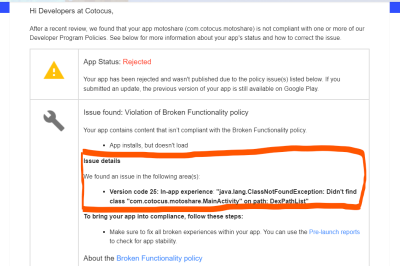
Action Required: Your app is not compliant with Google Play Policies
Error: Solution: Step 1: Check the MainActivity Class Ensure the MainActivity class exists: Step 2: Check the AndroidManifest.xml Verify the activity declaration: MainActivity.kt and AndroidManifest.xml the package name in the same Step 3: Check the Build Configuration
-
![Laravel say that Auth guard [] is not defined](https://www.sreschool.in/wp-content/themes/visualblogger/assets/img/featured_default.png)
Laravel say that Auth guard [] is not defined
Error: Sulotion: Step 1: Define the web Guard in config/auth.php Open the config/auth.php file in your Laravel project and make sure that the guards array includes a web guard definition. It should look something like this: Step 2: Ensure the providers Array Is Correctly Set Up In the same config/auth.php file, ensure that the providers…
-
composer require laravel/passport command error
Error: Solution: To resolve this issue, you can try the following steps: Step 1: Update Composer Dependencies Ensure that your existing dependencies are up-to-date by running: Step 2: install Version of Laravel Passport Step 3: Use the –with-all-dependencies Flag Step 4: Clear Composer Cache
-
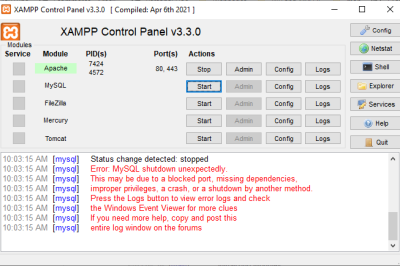
XAMPP – Error: MySQL shutdown unexpectedly
Error: Solution: Step 1: Rename the folder C:\xampp\mysql\data to C:\xampp\mysql\data_old Step 2: Create a new folder C:\xampp\mysql\data Step 3: Copy the content that resides in C:\xampp\mysql\backup to the new C:\xampp\mysql\data folder Step 4: Copy all your database folders that are in C:\xampp\mysql\data_old to C:\xampp\mysql\data (skip the mysql, performance_schema, and phpmyadmin folders from C:\xampp\mysql\data_old) Step 5: Finally copy the ibdata1 file from C:\xampp\mysql\data_old and replace it inside C:\xampp\mysql\data folder Step 6: Now Start…
-
composer require team-teatime/laravel-forum:dev-master
The command composer require team-teatime/laravel-forum:dev-master attempts to install the team-teatime/laravel-forum package from its dev-master branch, which is often the latest development version of the package. However, since you’re dealing with issues related to compatibility and installation, here’s how you should proceed: Steps to Run the Command: Step 1: Ensure You Are in Your Project Directory:…
-
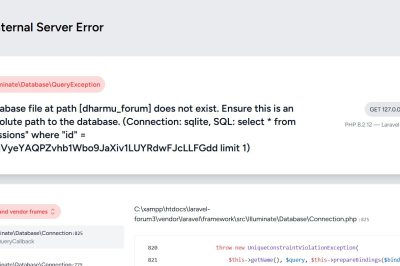
Database (database/database.sqlite) does not exist. The database works from artisan tinker
Error: Solution: 1. Check the Database Configuration in .env File: Change DB_CONNECTION=sqlite to DB_CONNECTION=mysql
-
Script @php artisan package:discover handling the post-autoload-dump event returned with error code 255
Error: Solution: Update the Handler Class To fix this issue, you need to update the method signature in your App\Exceptions\Handler class. 1. Open the Handler.php File Navigate to app/Exceptions/Handler.php. 2. Update the report Method Signature Replace: With: 3. Update the render Method Signature If your render the method also accepts an Exception, you’ll need to…
-

Your requirements could not be resolved to an installable set of packages.
Error: Solution: The error you’re encountering is due to the fact that the version of the pusher/pusher-php-server package you’re trying to install requires a PHP version that is older than the one you currently have (PHP 8.2.12). Specifically, the versions of pusher/pusher-php-server listed are only compatible with PHP 7.x or earlier. Solution: Update the Package…
-

XML declaration allowed only at the start of the document
Error: Solution: Common Issues with XML Sitemaps Example of a Valid XML Sitemap Structure Adjustments to my PHP and XSL Structure: This updated PHP code ensures each hospital entry includes elements like <loc>, <lastmod>, <changefreq>, and <priority>, all of which are part of the standard sitemap protocol. Validation: Validate your XML sitemap using an online…
-
What is an ISIN Code?
What is an ISIN Code? The International Securities Identification Number (ISIN) is a 12-character alphanumeric code that uniquely identifies a specific securities issue, such as stocks, bonds, options, and futures. It is a standardized code used globally to ensure uniform identification of securities. Structure: Country Code: 2 characters (e.g., ‘IN’ for India) National Security Identifier:…
-

How to Create an XML Sitemap in Laravel
The dynamic sitemap.xml file creation in the Laravel application will be covered in this tutorial on Laravel 10. Furthermore, we also like to explain how to read the Laravel application’s sitemap xml file. You can use the spatie/laravel-sitemap package to construct an XML sitemap in a Laravel application. The steps—package installation, setup, and sitemap generation—are…
-
Top 50 Tourist Destination in around Bengalure in Karnataka
Karnataka, a state in southwest India, is known for its rich heritage, diverse culture, and stunning landscapes. Bengaluru, the capital city, is a gateway to many enchanting tourist destinations within the state. Here’s a list of the top 50 tourist spots you must visit in and around Bengaluru, and Karnataka. 1. Bangalore Palace 2. Lalbagh…
-

The quickest method for determining if your PHP array is empty
The fastest way to check if an array is empty To check whether a PHP array is empty or not, use the empty() function: This is how I prefer to do it. However, there are several ways to determine whether an array is empty, like: You can choose to end the process there or continue reading to…
-

A brief guide on clearing Laravel’s cache
Introduction to clearing Laravel’s cache Cache clearing is advised when unsure. You will discover how to empty each and every cache that Laravel uses in this tutorial. In Laravel, use php artisan optimize: clear to clear the cache. Regardless of the cache driver you are using, this works. The bootstrap files (events, compiled, config, routes,…
-

Change PayPal Sandbox to Live Mode Credentials
There are multiple phases involved in converting your Laravel application’s PayPal integration from Sandbox to Live. It is necessary for you to make sure your application is set up for production use and update your PayPal credentials and endpoints. This is a thorough how-to instruction for doing it: Step 1: Get Live PayPal Credentials Step…
-
How DevOps Consulting Services Drive Digital Transformation
Digital transformation is a critical imperative for businesses aiming to stay competitive in today’s fast-paced technological landscape. At the heart of this transformation is the adoption of DevOps practices, which streamline operations, enhance collaboration, and accelerate innovation. DevOps consulting services play a pivotal role in facilitating this transformation. This comprehensive guide explores how DevOps consulting…
-

Handle clicks from your users using jQuery
Introduction to click events in jQuery A common feature in web development are click events. They can’t be avoided, but jQuery provides an easy solution to deal with them. Additionally, I’ll demonstrate how to do it with Vanilla JavaScript, which is simply JavaScript that doesn’t require any other libraries. The .click() method in jQuery It…
-

How to resolve the Laravel “419 Page Expired” problem.
Introduction to the “419 Page Expired” error in Laravel Have you ever used HTTP code 419 in your Laravel applications and received the “Page Expired” error? Often, it’s a straightforward problem with tokens connected to Cross-Site Request Forgery (CSRF). Let’s examine its meaning and potential solutions. Why “419 Page Expired” happens and how to fix…
-

Easily convert a PHP array to JSON
Convert a PHP array to JSON To convert a PHP array to JSON, you can use the json_encode() function. Here’s how it’s done: This code piece, when run, will produce the following output: {“foo”:”bar”,”baz”:”qux”}. Your PHP array is now a JSON string in an instant! Let’s unwrap the mystique around json_encode(): When to convert a PHP…
-

How to publish API and broadcast route files in Laravel 11
New projects will get a leaner skeleton as of Laravel 11. Some of the route files, which might be intimidating for inexperienced developers, have to be removed as part of the endeavour to make it happen. That being said, as your application expands, you may need to build a RESTful API or, for an app…

Follow Us
Recent Posts
- How SRE Managers Lead Reliability Programs Across Organizations
- Smart Guide To Baby Dreams With IvfHospitalsNow

- Complete Guide to Certified Site Reliability Manager Certification
- Awesome City Play And Joyful Weekends With HyderabadOrbit

- Career Growth After Certified Site Reliability Architect Certification
Categories
- access 1
- Administration 1
- AIOps 1
- Apache 2
- API 3
- App 7
- Application 1
- Bottom 1
- class 1
- CLI 1
- Client 1
- Commands 3
- Composer 1
- Container 1
- daemon 1
- Database 1
- DevOps 2
- DevSecOps 2
- Docker 3
- dropdown 1
- Encryption 1
- Error 1
- features 1
- Flutter 20
- Form 2
- Gateway 1
- Google 2
- google play console 2
- Google verification 1
- install 1
- Integrate 1
- Key 2
- lampp 1
- Laravel 19
- linux 5
- List 1
- MaterialApp 1
- Medical Tourism 1
- MLOps 2
- Motoshare 1
- MySQL 4
- NavigationBar 1
- Navigator 2
- package 1
- Payment 2
- Paypal 1
- Performance 1
- PHP 3
- phpmyadmin 7
- PID 1
- Ping 1
- Play Store 2
- PONG 1
- port 1
- ProFTPD 1
- Redis 1
- root 1
- running 1
- search 1
- Security 2
- server 3
- SRE 2
- subtype 1
- Troubleshooting 2
- ubuntu 1
- ui 1
- Uncategorized 690
- Unhandled 1
- Validation 2
- value 1
- WakilSahab.in 1
- widgets 2
- Windows 2
- XAMPP 5
- YouTube 1
Tags
#AssetManagement #Automation #CloudComputing #CloudEngineering #CloudInfrastructure #CloudNative #ContentManagement #DAM #DAMSoftware #DevOps #DevOpsCertification #DevOpsSchool #DevSecOps #DigitalAssetManagement #DigitalAssets #InfrastructureAsCode #ITCertification #Kubernetes #PlatformEngineering #RajeshKumar #ReliabilityEngineering #SEOManagement #SiteReliabilityEngineering #SRE #SRECertification #Sreschool #SystemReliability #TechCareers #Wizbrand Laravel