Dharmendra Kumar, Senior Software Engineer & Co founder at MyhospitalNow
-
How To Secure Laravel Website From Hackers
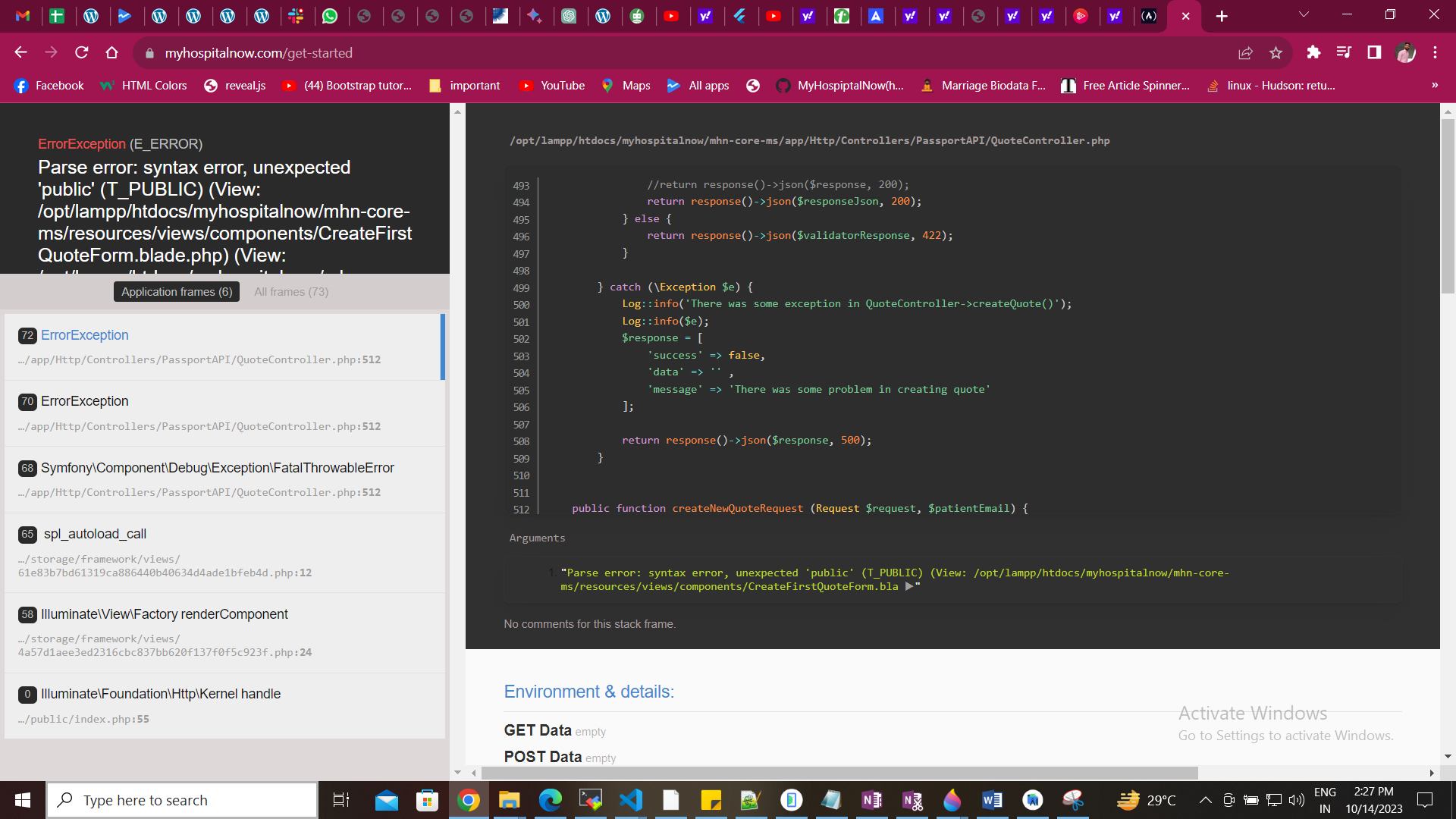
Here are some tips on how to secure a Laravel website from potential hackers: Step 1: Show this error Go to . env and change APP_DEBUG: true to false Problem is solved after false Step 2: Show this error Go to config/app.php add this code Problem is solved after false hide every creadation data
-

The Dart Programming Language for Flutter Beginners
The general-purpose programming language Dart is available for free. Google was the one who developed it initially. The object-oriented language Dart has syntax in the C manner. Unlike other programming languages, it offers concepts like classes and interfaces. Arrays are not supported by Dart. Arrays, generics, and optional type are examples of data structures that…
-

Laravel Passport Install Class Not Found
Error Solution: Step 1: Delete composer.lock file Step 2: Run this command composer require laravel/passport –with-all-dependencies Step 3: Add version passport “laravel/passport”: “11.9.0”, After that run composer update Thanks my error is solved
-

How to fix the error “In order to use the Auth::routes() method, please install the laravel/ui package” in laravel 10
Error Solution: It indicates that you need to install the Laravel/ui package in order to use the Auth::routes() method. To resolve this issue, you can follow these steps: Step 1: Install the laravel/ui package using Composer: Step 2: Generate authentication scaffolding for it. For Bootstrap-based scaffolding: For Vue.js-based scaffolding: For React-based scaffolding: Step 3: Use Auth::routes() in routes/web.php
-

Form Validation in Flutter
Form validation is required for all applications. There exist alternative methods for validating forms within a Flutter application, such as employing a TextEditingController. However, in large systems, it might become complex to manage text controllers for every input. Thus, Form provides us with a useful way to confirm user inputs. While the example below applies…
-
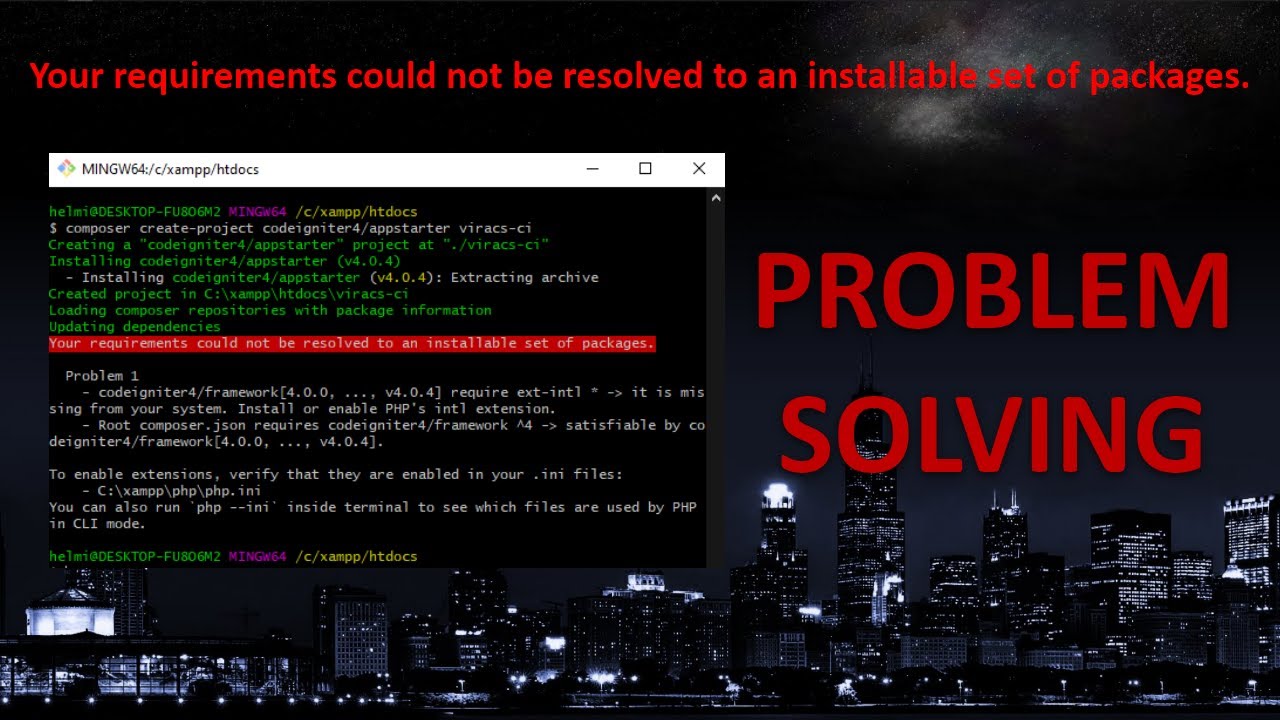
To enable extensions, verify that they are enabled in your .ini files:- C:\xampp\php\php.ini
Error Solution: For me, I just follow this steps. Step 1: At first, You need to install/activate sodium goto D:\xampp\php\ and open file php.ini. Step 2: Now search for sodium Step 3: You will see ;extension=sodium Step 4: Remove semi colon ; and save file. Step 5: Now reload apache, and run the composer again.
-
Mastering CloudOps: Best Practices and Strategies
Being on the cutting edge of technology is essential. The growth of CloudOps, a field that combines cloud computing and operations to improve the efficiency and agility of enterprises, has been one of the most significant recent advances. If you’re debating if CloudOps is the best course of action for you or your business. What…
-

How to create a search bar in Flutter
Flutter is renowned for the versatility it provides to a broad range of applications, including banking apps, e-commerce sites, and educational programmes, among many others. Widgets, which serve as basic building blocks for intricate applications, enable all of this. Every app may be dissected into a number of components, some universal to all apps and…
-

how to upload image in flutter with laravel store api
You must take various steps, such as setting up the Laravel API endpoint and putting the Flutter code for image uploading into practise, in order to upload an image from a Flutter app to a Laravel API for storage. Here is a basic how-to tutorial for doing this: Step 1: Implement the Image Upload dart…
-

rejected master -> master (non-fast-forward)
Error Solution: Your local Git branch is behind the remote branch, which is why Git is blocking you from pushing changes to the remote repository that would cause a non-fast-forward update. This is why you are receiving the error message. You must first synchronise the modifications made in the remote branch with your local branch…
-

Launching URLs in Flutter with url_launcher
To open a URL in a Flutter app using the url_launcher package, you can follow these steps: Step 1 : Add url_launcher to your pubspec.yaml file: Step 2: Run flutter pub get to fetch and install the package. Step 3: Import the url_launcher package in your Dart file where you want to open the URL:…
-

How to resolve version solving failed in flutter
Error Solution: I need to use dependency override. Since this code is from my project, the path provider was the issue; hence, you must locate the relevant package. This will resolve your issue if you take the conflict and place it inside the dependency_overrides.
-

Flutter Multiple Select dropdown list
how to use a multiple select drop-down list with the same design? I utilised the (flutter_custom_selector) plugin, but I need to know how to construct a multiple select dropdown list in Flutter without using any plugins. My code is and my design is Click to view Design image
-
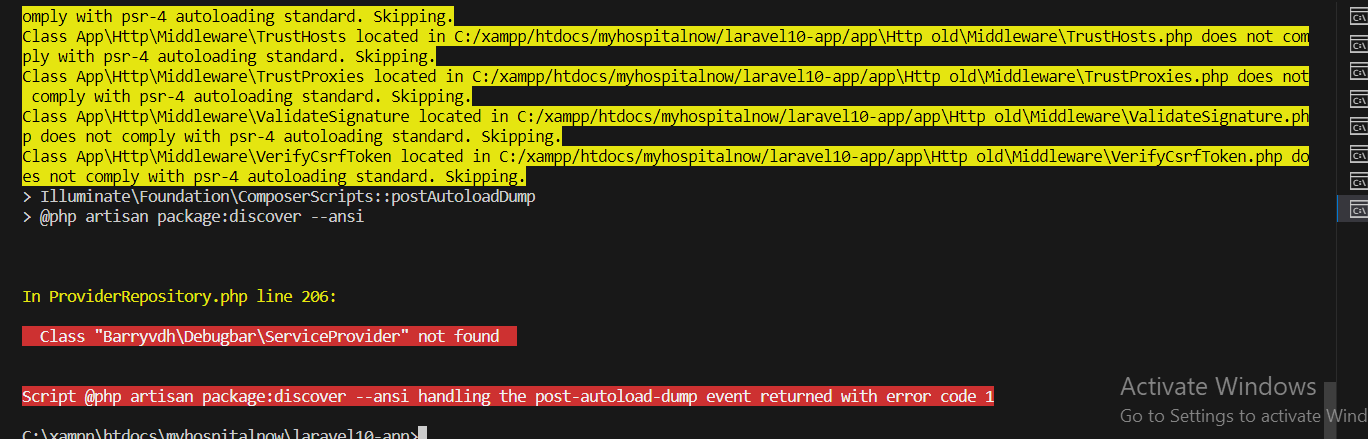
Envoy raise Class ‘Barryvdh\Debugbar\ServiceProvider’ not found?
Error Solution: Go to composer.json and add this code “barryvdh/laravel-debugbar”: “^3.2”, Step 2: Composer update Problem is solved
-
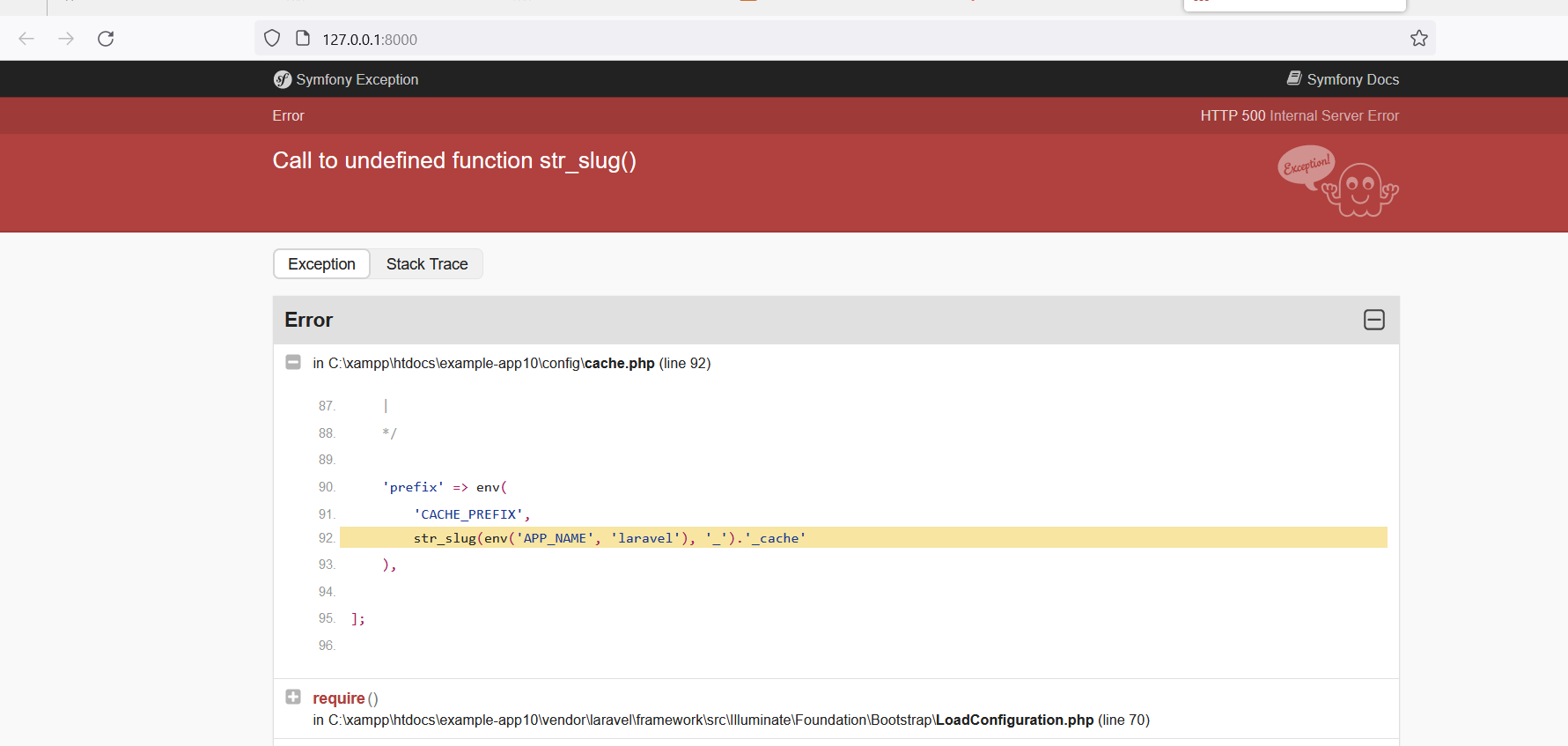
C:\xampp\htdocs\example app10\config\cache.php:92
Error C:\xampp\htdocs\example-app10\vendor\laravel\framework\src\Illuminate\Foundation\Application.php:261 Solution: Go to config\cache.php file and update latesh laravel 10 cache.php file
-

“Connection for controluser as defined in your configuration failed” with phpMyAdmin in XAMPP
Error: connection for controluser as defined in your configuration failed. phpmyadmin xampp mysqli::real_connect(): (hy000/1045): access denied for user ‘pma’@’localhost’ (using password: no) Solution: If you need to start MySQL, you can do so from the XAMPP control panel or by using the terminal. Here are the steps to start MySQL from the terminal: Step 1:…
-
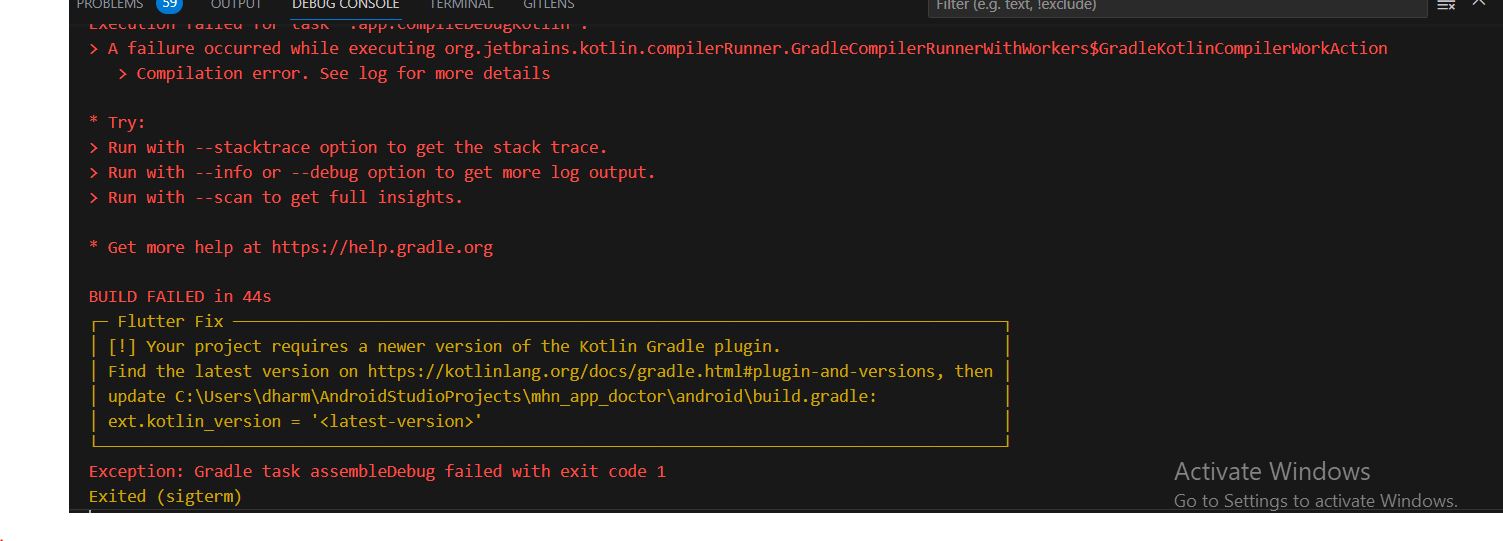
Your project requires a newer version of the Kotlin Gradle plugin. (Android Studio)
Error: Solution: Step 1: Go to this https://kotlinlang.org/docs/gradle.html and find latesh version. Step 2: Copy this latesh version and past build.gradle file Step 3: Run project after that proble is solved
-
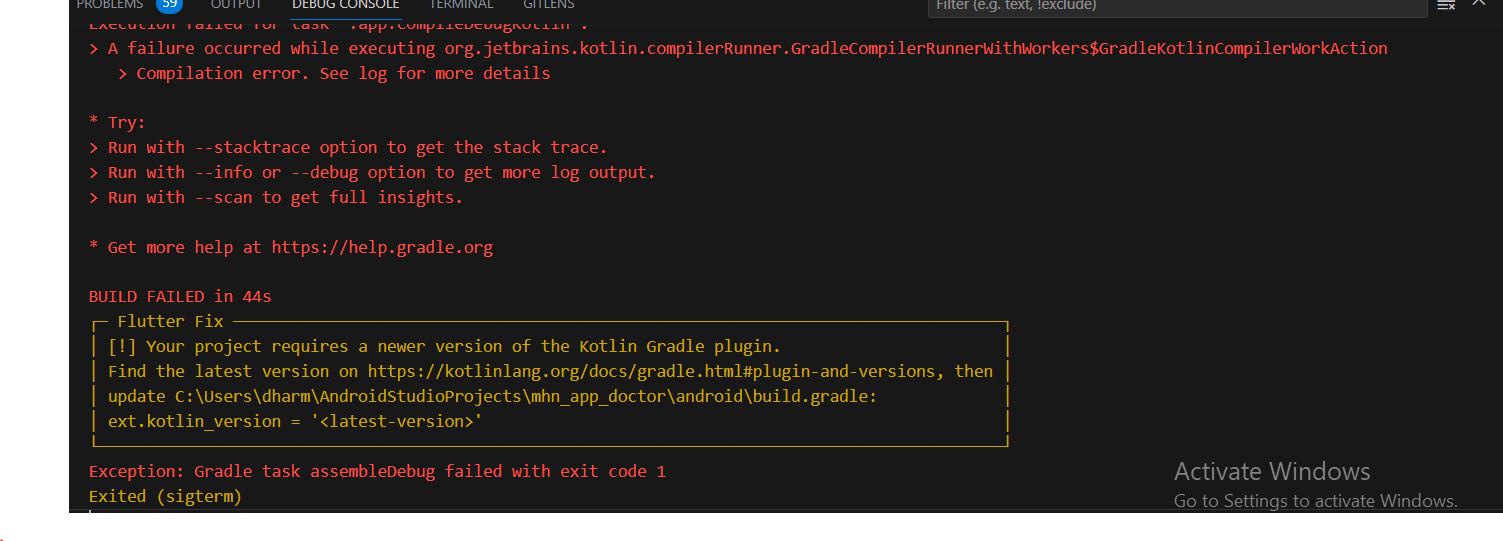
Flutter Error – Project require a newer version of kotlin Gradle plugin
Error Solution: Update Flutter Kotlin version to latest To solve “newer version of kotlin gradle plugin”, Simple you need to update kotlin version i.e ext.kotlin_version. Navigate to Project > android > build.gradle The current latest version at the time of this article is 1.6.10, It will change in future. So to get the updated latest version of…
-
![Flutter Run Failure [INSTALL_FAILED_OLDER_SDK] Requires newer sdk version #33 (current version is #30)](https://www.sreschool.in/wp-content/uploads/2023/09/Capture.jpg)
Flutter Run Failure [INSTALL_FAILED_OLDER_SDK] Requires newer sdk version #33 (current version is #30)
Error Solution: Go to build.gradle file and change Version
-

Most Popular YouTube Channel for Software Engineers DevOps, SRE, DevSecOps, AIOps, MLOps … ‘FREE Tutorials’
1. DevOpsSchool (https://www.youtube.com/@TheDevOpsSchool) Software engineers interested in DevOps, SRE, DevSecOps, AIOps, MLOps, DataOps, Kubernetes, AWS, Azure, Python, Google Cloud, and Microservices should check out DevOpsSchool. This channel is a go-to source for people wishing to improve their talents because to its extensive library of tutorials and in-depth explanations. 2. scmGalaxy (https://www.youtube.com/@Scmgalaxy) scmGalaxy provides a plethora…

Follow Us
Recent Posts
- Accelerating Enterprise Software Delivery Through Advanced Infrastructure Automation
- Establishing Global Systems Infrastructure Excellence Through Strategic Architecture and Leadership Mentorship

- Complete Beginner Guide to SRE Principles and Practices Explained
- Business Growth and Stability Through Site Reliability Engineering Practices
- How SRE Bridges the Gap Between Development and Operations
Categories
- access 1
- Administration 1
- AIOps 1
- Apache 2
- API 3
- App 7
- Application 1
- Bottom 1
- class 1
- CLI 1
- Client 1
- Commands 3
- Composer 1
- Container 1
- daemon 1
- Database 1
- DevOps 2
- DevSecOps 2
- Docker 3
- dropdown 1
- Encryption 1
- Error 1
- features 1
- Flutter 20
- Form 2
- Gateway 1
- Google 2
- google play console 2
- Google verification 1
- install 1
- Integrate 1
- Key 2
- lampp 1
- Laravel 19
- linux 5
- List 1
- MaterialApp 1
- Medical Tourism 1
- MLOps 2
- Motoshare 1
- MySQL 4
- NavigationBar 1
- Navigator 2
- package 1
- Payment 2
- Paypal 1
- Performance 1
- PHP 3
- phpmyadmin 7
- PID 1
- Ping 1
- Play Store 2
- PONG 1
- port 1
- ProFTPD 1
- Redis 1
- root 1
- running 1
- search 1
- Security 2
- server 3
- SRE 2
- subtype 1
- Troubleshooting 2
- ubuntu 1
- ui 1
- Uncategorized 582
- Unhandled 1
- Validation 2
- value 1
- WakilSahab.in 1
- widgets 2
- Windows 2
- XAMPP 5
- YouTube 1
Tags
#AssetManagement #CloudComputing #CloudEngineering #CloudNative #CloudSecurity #ContentManagement #DAM #DAMSoftware #DevOps #DevOpsCareer #DevOpsCertification #DevOpsSchool #DevOpsTraining #DevSecOps #DigitalAssetManagement #DigitalAssets #InfrastructureAutomation #PlatformEngineering #RajeshKumar #RajeshKumarMentor #ReliabilityEngineering #SEO #SEOManagement #SiteReliabilityEngineering #SRE #Wizbrand Bike Laravel Launches Services